



The gap between "inspection finished" and "report delivered" is where most programs quietly bleed money and credibility. The field work is done. The data is captured. And then the report sits for three days because someone has to type it up, someone else has to review it, and a third person needs to sign off — and all three are busy.
If your average turnaround is sitting at two to four business days, that's not a people problem. It's a workflow problem. And almost none of that time is actual value-adding work. It's waiting, reformatting, chasing signatures, and re-keying data that already exists somewhere.
This playbook is narrow on purpose. It's only about inspection report turnaround time — mapping where the hours actually go, building templates that cut re-keying, setting up auto-population so the report half-writes itself, and defining approval SLAs that stop reports from dying in someone's inbox. No governance theory, no analytics strategy. Just the mechanics of getting a finished inspection into the client's hands faster.
Start by mapping where the hours actually disappear
Before touching templates or software, map your current state honestly. Most managers think their bottleneck is report writing. When you actually time it, the writing is rarely the problem. The waiting is.
Below is a realistic current-state breakdown for a mid-size inspection team doing field compliance work. These are the kinds of numbers that show up when you stopwatch the process instead of guessing:
| Stage | Who touches it | Active time | Elapsed time (wall clock) |
|---|---|---|---|
| Field inspection complete | Inspector | — | — |
| Photos/notes synced + organized | Inspector | ~25 min | Same day to next morning |
| Report drafting (re-keying field data) | Inspector or admin | ~45 min | 1 day later |
| Internal technical review | Reviewer | ~20 min | 1–2 days in queue |
| Corrections / back-and-forth | Inspector + reviewer | ~15 min | +1 day |
| Final sign-off | Manager | ~5 min | +0.5–1 day |
| Formatting + delivery | Admin | ~15 min | Same day as sign-off |
Add up the active time and you're at roughly two hours of real work. Add up the elapsed time and you're at three to four days. That gap — two hours of work stretched across four days — is the entire problem in one table.
Here's a simple workflow map showing where time is spent and where queues form.
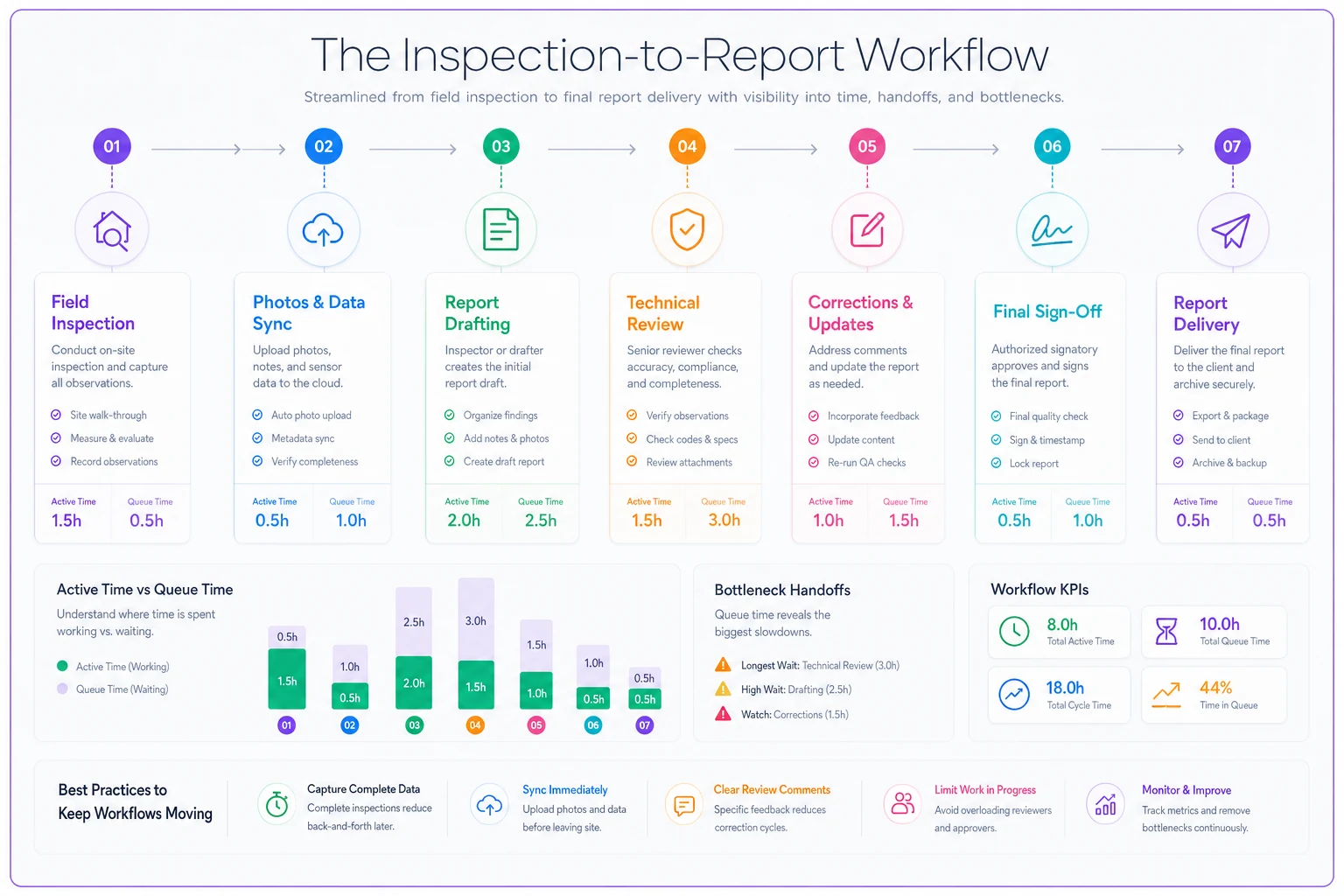
The insight most teams miss: you don't speed up turnaround by making people type faster. You speed it up by killing queue time between stages. Every handoff where a report sits waiting is where your real hours are disappearing.
When you map yours, don't pull averages from memory. Pull the last 20 reports, note the timestamp when field work finished and when it was delivered, and look at the distribution. You'll almost always find a handful of outliers dragging the whole thing out — reports that sat for a week because the reviewer was on-site and nobody picked up the slack.
The re-keying tax nobody budgets for
A pattern that comes up constantly: the inspector already entered everything in the field — the site ID, the equipment tag, the readings, the pass/fail results, the photos. Then back at the office, someone opens a blank Word template and types most of it in again.
Eliminate inspection delays and errors.
Chekzly helps you plan, execute, and document inspections efficiently and accurately.
- Real-time inspection tracking
- Automated report generation
- Compliance and checklist management
No credit card required
That's the re-keying tax. It's not just the 45 minutes of duplicate typing. It's the transcription errors, the mismatched equipment IDs, the photo captions that get swapped. Those errors get caught in review, which triggers a correction cycle, which adds another day.
This usually happens because the field capture tool and the report document live in two separate worlds. The inspector fills out a checklist app, and the report is a formatted document in a different system. No bridge, so a human becomes the bridge.
The fix is structural: your field data and your report template need to share the same fields. When an inspector records "Panel 4B — reading 480V — PASS," that should flow directly into the corresponding line of the report without anyone retyping it. The principle is straightforward — capture once, use everywhere.
Build templates that assume auto-population
Most inspection report templates are designed for humans to fill in from scratch. That's backwards. A good template is designed so that 70–80% of it populates itself, and the inspector's effort goes only toward the narrative judgment that genuinely needs a human.
-
Auto-filled fields — site info, date, inspector ID, asset tags, measured values, checklist pass/fail results, GPS/timestamp data. None of this should ever be typed twice.
-
Conditional blocks — sections that appear or disappear based on results. If everything passes, the "deficiencies" section collapses. If an item fails, a standardized finding block appears with required fields for severity, location, and recommended action.
-
Narrative fields — the short free-text sections where an inspector explains context, judgment calls, or unusual conditions. This is the only part that genuinely needs original writing.
A mistake teams make: one giant template for every inspection type. It feels efficient but forces inspectors to scroll past dozens of irrelevant fields, which slows them down and invites errors. Modular, type-specific templates almost always beat the one-template-to-rule-them-all approach.
One small but high-impact detail: lock the formatting. A significant chunk of "formatting time" at the delivery stage is someone fixing broken tables, inconsistent fonts, and misaligned photo grids. If the template controls formatting rigidly, that whole stage nearly vanishes.
Auto-population patterns that actually hold up
Auto-population sounds obvious, but there are patterns that work reliably and patterns that create new headaches.
-
Field-to-report mapping. Every field in your capture checklist maps to a specific slot in the report. This is the foundational pattern. Set it up once per report type and drafting drops from 45 minutes to maybe 10 minutes of narrative writing.
-
Conditional finding generation. When a checklist item is marked fail, the system generates a pre-structured finding block with the deficiency type, location, and a severity dropdown. The inspector adds detail instead of building the block from scratch. This is where AI automation earns its place — it can draft standardized language for a finding based on the failure type and the inspector's short note, leaving them to review and adjust rather than write from zero. Used this way, it cuts drafting time without removing the human judgment that matters.
-
Photo-to-finding linking. Photos captured against a specific checklist item automatically attach to the right section with the right caption. The manual version of this — matching 30 photos to 30 findings by hand — is both slow and error-prone.
-
Prior-report carryover. For recurring site inspections, carrying forward static details (site layout, equipment list, access notes) means the inspector only updates what changed. On a monthly inspection cycle, this alone can cut drafting time noticeably.
The pattern that doesn't hold up: auto-populating conclusions. Don't let any system auto-generate a pass/fail verdict or an overall risk rating without an inspector explicitly confirming it. A report that's fast and wrong is worse than a correct one delivered slowly.
The approval SLA: where days turn into hours
This is the part most teams skip, and it's where the biggest gains hide. You can auto-populate everything and still sit at three-day turnaround if reports pile up waiting for review and sign-off.
An approval SLA is a written rule for how long each stage is allowed to hold a report before it has to move. Without it, "review" has no deadline, so it happens whenever the reviewer gets to it — which is usually last.
-
Draft submitted within 4 working hours of field completion. With auto-population doing most of the work, this is realistic. The inspector submits before leaving the area or by end of day.
-
Technical review within 4 working hours of submission. The reviewer gets a notification, not a buried email. If they can't review in the window, it escalates automatically to a backup reviewer.
-
Corrections returned within 2 hours. Small fixes shouldn't trigger a full new cycle. Minor corrections get flagged inline, the inspector adjusts, no full re-review required.
-
Final sign-off within 2 working hours of review approval. Manager sign-off is a 5-minute task; the SLA just ensures it doesn't wait a day.
-
Delivery immediately on sign-off. Fully automated. No "I'll send it tomorrow."
The single most important design choice here is the backup escalation. Reviews stall almost always because one bottleneck person is unavailable. If your SLA automatically reroutes to a second reviewer when the window expires, one person's busy day stops being the whole program's delay.
Checklist: are your approval SLAs actually working?
-
[ ] Every stage has a defined maximum hold time, in hours not days
-
[ ] Reviewers get an active notification, not a passive inbox email
-
[ ] There's a named backup for every review and sign-off role
-
[ ] Minor corrections have a fast-track path that skips full re-review
-
[ ] Delivery happens automatically on sign-off, no manual send step
-
[ ] You can see, at a glance, which reports are breaching SLA right now
-
[ ] Breaches are reviewed weekly to find the recurring bottleneck
If you can't check the last two boxes, you have SLAs on paper but not in practice.
A real scenario: regional facility inspection firm
A regional firm doing commercial facility compliance inspections — roughly 40 inspectors, somewhere around 900 reports a month — was running at an average turnaround of about 3.5 business days. Clients weren't furious, but they were asking for updates constantly, and the admin team spent a meaningful chunk of each week just answering "where's my report?" emails.
When they mapped it out, the active work per report was under two hours. The rest was queue time. Two stages stood out: drafting (because everything was re-keyed from the field app into Word) and technical review (because three senior reviewers were field-deployed most days and reports waited for them).
They made three changes. First, they mapped field checklist fields directly into templated reports, so drafting became narrative-only. Second, they built conditional finding blocks so failures generated structured sections automatically. Third — and this mattered most — they put a 4-hour review SLA in place with automatic reroute to a backup reviewer when the primary was unavailable.
The results over about two months: average turnaround dropped to under one business day, with a good share of straightforward reports going out same-day. Drafting time fell from roughly 45 minutes to around 12. The "where's my report" emails dropped off noticeably, which freed up admin capacity nobody had been tracking. No headcount change. The gains came almost entirely from killing queue time, not from working faster.
When this makes sense — and when it doesn't
This playbook pays off most when you're doing volume, repeatable inspections with consistent report formats. Facility compliance, equipment inspections, recurring site audits — anything where the report structure is similar every time. That's where templates and auto-population compound their value.
If your reports are highly bespoke — complex forensic investigations, one-off specialized assessments where every report is structurally different — heavy templating will fight you. You'll spend more time maintaining conditional logic than it saves. For those, focus the effort purely on the SLA and handoff speed.
Who should not rush this: teams with messy, inconsistent field capture. If your inspectors record data differently from one another, auto-population will just propagate that inconsistency faster. Fix your field capture standards first, then automate the report flow. Automating a messy process only gets you to the wrong answer sooner.
One honest caution on the AI-assisted drafting piece: it's genuinely useful for generating standardized finding language and first-draft narratives, but it needs a real review step. The goal is to remove typing, not judgment. Keep the inspector as the one who confirms every conclusion, and you get the speed without the risk.
Where to start Monday morning
Don't try to rebuild everything at once. Pull your last 20 reports and timestamp the field-complete and delivered moments. Find your longest queue stage — it's almost always review or drafting. Attack that one stage first with either a shared-field template or a review SLA with backup escalation, and measure the change before touching anything else.
The reason inspection reports take days instead of hours is rarely that the work is hard. It's that finished reports sit waiting between people. Map the waiting, template the typing, and put deadlines on the handoffs. Do those three things and the days-to-hours shift stops being an aspiration and starts being Tuesday.
The reason inspection reports take days instead of hours is rarely that the work is hard. It's that finished reports sit waiting between people. Map the waiting, template the typing, and put deadlines on the handoffs. Do those three things and the days-to-hours shift stops being an aspiration and starts being Tuesday.
Ready to modernize your inspection process?
Join 500+ inspection teams using Chekzly to reduce paperwork, improve compliance, and accelerate reporting.