



Your field team takes 400 photos during a pipeline integrity inspection. Three months later, opposing counsel challenges every single one because the metadata shows file modifications after the inspection date. Not because someone tampered with evidence — but because someone renamed files for organization, which updated the "modified" timestamp.
The metadata gap that kills admissibility before you even submit
This scenario plays out constantly in inspection programs. Teams capture perfect documentation in the field, then accidentally destroy its legal defensibility through basic file handling mistakes back at the office. The photos themselves are pristine. The inspection was thorough. But none of it matters when metadata inconsistencies create doubt about authenticity.
Most teams don't realize how easily photo evidence gets compromised. A simple file rename changes timestamps. Email transfers strip GPS data. Cloud storage recompresses images. Each seemingly innocent action creates cracks that smart attorneys exploit during litigation.
Why inspection photos fail admissibility tests
Photo evidence usually fails between capture and storage. A field inspector takes a photo at 2:47 PM showing a corroded support beam. The camera names it "IMG8374.jpg". Back at the office, someone renames it to "Site5BeamCorrosionMarch15.jpg" for better organization. This simple rename changes the file's modification date to today, not the inspection date.
Eliminate inspection delays and errors.
Chekzly helps you plan, execute, and document inspections efficiently and accurately.
- Real-time inspection tracking
- Automated report generation
- Compliance and checklist management
No credit card required
Now you have a photo claiming to show conditions on March 15th, but with metadata showing it was modified on March 22nd. Even though only the filename changed, this discrepancy opens doors for challenges. Opposing parties argue the image could have been altered. Auditors flag it as potentially unreliable. Insurance claims get delayed while you scramble to prove authenticity.
Different devices make the problem worse. One inspector uses a DSLR that embeds GPS coordinates. Another uses an iPhone that strips location data when sent via email. A third uses an Android tablet that saves everything to Google Photos, which recompresses images and changes metadata. By the time these photos reach your inspection database, their metadata tells completely different stories about when, where, and how they were captured.
Most inspection managers focus on photo content — getting clear shots of defects, including scale references, ensuring good lighting. These elements matter, but they're not what typically kills photo admissibility during litigation or regulatory audits.
The hidden metadata that auditors actually check
When auditors or legal teams examine photo evidence, they're not just looking at the image. They're examining layers of embedded information most people never see.
EXIF data lives inside every digital photo. It records camera settings like aperture, shutter speed, ISO, and focal length. More importantly for inspections, it captures the exact date and time of capture, GPS coordinates (if enabled), and device information. This data proves when and where a photo was taken, assuming you don't accidentally destroy it during handling.
File system metadata exists separately from EXIF data. It tracks when files were created, modified, accessed, and moved on your computer system. Every time someone opens a photo to view it, the "last accessed" date updates. Copy it to a new folder? The "created" date becomes today, not the original capture date. These timestamps often contradict EXIF data, creating inconsistencies that undermine admissibility.
Hash values provide the strongest proof of authenticity. A hash is like a digital fingerprint — change even one pixel in an image, and the hash completely changes. Smart inspection programs generate MD5 or SHA-256 hashes immediately after capture, before any file handling occurs. This baseline hash proves the image hasn't been altered, regardless of filename changes or file system dates.
Cloud storage and collaboration tools silently modify files. Upload a photo to Dropbox, and it might strip GPS data for privacy. Share via Slack, and it recompresses the image, changing the file structure. Email it through Outlook, and Exchange might resize it to meet attachment limits. Each modification breaks the chain of custody, even though the visual content remains unchanged.
| Metadata Type | What It Records | How It Gets Corrupted |
|---|---|---|
| EXIF Data | Capture time, GPS, camera settings | Cloud compression, email transfer |
| File System | Creation, modification, access dates | File copies, renames, moves |
| Hash Values | Digital fingerprint of exact file | Any modification to file content |
These timestamps and embedded records are what auditors use to verify a photo's provenance. Any inconsistency between EXIF, file system metadata, and hash records becomes a focal point in disputes.
Camera settings that preserve legal defensibility
Getting camera settings right before inspections prevents massive headaches during audits.
Date and time accuracy seems basic but causes endless problems. Cameras don't automatically adjust for daylight saving time. They don't sync with internet time servers. After sitting unused for months, internal clocks drift. A camera showing 3:15 PM when it's actually 4:22 PM creates a 67-minute discrepancy that opposing counsel will exploit. Before every inspection, verify camera time matches official time sources to the minute.
GPS settings need careful configuration. Enable GPS on cameras and phones, but understand the tradeoffs. GPS drains batteries faster, potentially leaving inspectors without documentation capability late in the day. Some facilities prohibit GPS recording for security reasons. When GPS must be disabled, document this restriction in your inspection notes and use alternative location verification methods like photos of building addresses or room numbers.
Image format matters more than resolution. Shoot in RAW format when possible — it captures maximum data and proves images haven't been processed. But RAW files are huge, eating storage space and slowing uploads. For routine inspections, high-quality JPEG works fine, but use minimal compression. Set JPEG quality to 95% or higher. The file size increase is worth the authenticity protection.
Resolution settings depend on your inspection type. For structural inspections where you might need to zoom in on hairline cracks, maximum resolution matters. For routine compliance checks, moderate resolution balances quality with manageable file sizes. Whatever you choose, keep it consistent. Mixing resolutions within an inspection series raises questions about why certain photos got different treatment.
Turn off in-camera effects and filters completely. No sharpening, no contrast enhancement, no HDR mode. These processing steps alter the original capture and create doubt about what the scene actually looked like. Auditors have seen too many cases where "enhancement" accidentally obscured critical details or made damage appear worse than reality.
Building filename patterns that scale
Generic names like "IMG8734.jpg" tell you nothing. Overly complex names like "2024-03-15Site5Building3Floor2Room204NorthWallCorrosionDamageInspectorJohnSmithCamera2_Photo037.jpg" become unwieldy and error-prone.
Effective naming follows a consistent pattern that captures essential information without becoming excessive. A format like "YYYYMMDDSiteIDLocationSequenceNumber" provides enough detail for retrieval while remaining manageable. "20240315PLT47Tank3001.jpg" immediately tells you when, where, and in what order the photo was taken.
Establish naming conventions before capture, not after. Many teams let cameras use default names during inspection, planning to rename later for organization. This destroys the original filename metadata and creates the modification date mismatches that kill admissibility. Configure cameras to use custom naming schemes, or train inspectors to rename immediately upon capture, before any file transfer occurs.
Sequential numbering within each inspection maintains capture order. This proves your documentation follows a logical progression through the facility. Gaps in sequence numbers raise questions. Did photo 017 get deleted because it showed something problematic? Why does the sequence jump from 023 to 027? Maintain continuous numbering, and if you must delete a photo (like an accidental pocket shot), document why that number is missing.
Include the inspector identifier in filenames, but keep it short. Full names make filenames too long and might violate privacy policies if shared externally. Use employee IDs or initials. "20240315PLT47Tank3JS001.jpg" links the photo to inspector John Smith without broadcasting his full name.
Avoid special characters that break systems. No slashes, colons, asterisks, or question marks. These characters have specific meanings to operating systems and databases. A filename with a colon might work fine on Mac but fail catastrophically when transferred to Windows. Stick to letters, numbers, hyphens, and underscores.
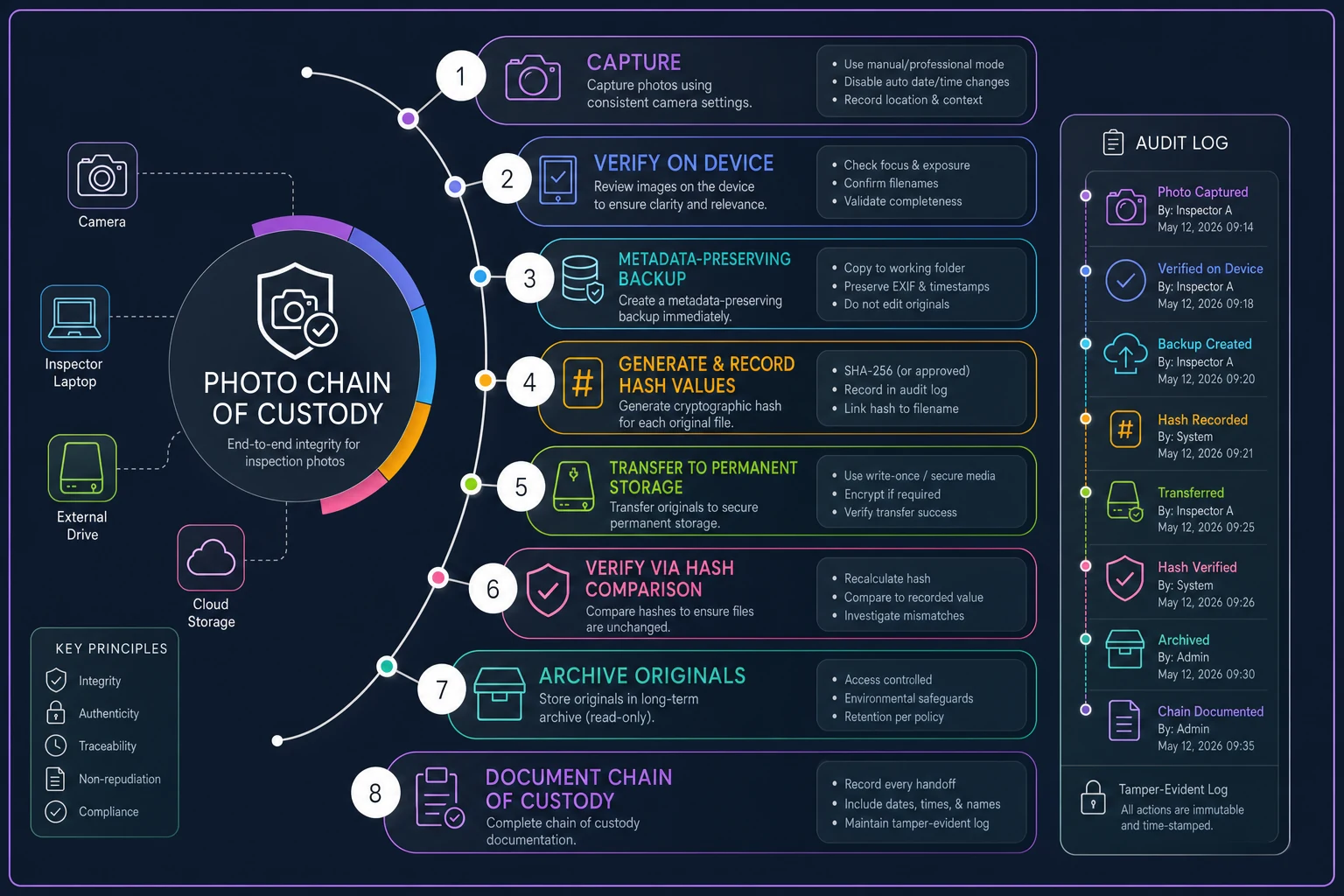
The workflow that maintains chain of custody
How you handle photos between capture and permanent storage determines their legal reliability. Every transfer, copy, and backup creates potential custody gaps that smart opposing counsel will exploit.
-
Capture photos with consistent camera settings
-
Verify all photos on camera before leaving site
-
Copy to backup device using metadata-preserving method
-
Generate and document hash values
-
Transfer to permanent storage system
-
Verify successful transfer via hash comparison
-
Archive original camera files separately
-
Document entire chain of custody in inspection report
Never edit original files, even for simple rotations. The moment you rotate an image to correct orientation, you've modified it. Instead, maintain originals in one folder and create clearly marked copies for any processing. "20240315PLT47Tank3001ORIGINAL.jpg" stays untouched forever. "20240315PLT47Tank3001ROTATED.jpg" can be edited as needed.
Visual overview of this workflow:
Use robocopy or rsync with timestamp-preserving flags to copy files without changing file system dates.
Never edit original files, even for simple rotations. The moment you rotate an image to correct orientation, you've modified it. Instead, maintain originals in one folder and create clearly marked copies for any processing. "20240315PLT47Tank3001ORIGINAL.jpg" stays untouched forever. "20240315PLT47Tank3001ROTATED.jpg" can be edited as needed.
When cloud storage breaks your chain of custody
Cloud storage seems perfect for inspection photos. Automatic backup, accessible anywhere, unlimited space. But cloud services modify files in ways that destroy admissibility, and most inspection managers don't realize it's happening.
Google Photos recompresses everything unless you explicitly choose original quality — and even then, it might strip metadata it considers "unnecessary." That GPS coordinate proving your inspector was actually on-site? Gone. The camera serial number linking the photo to your equipment inventory? Deleted. The original capture timestamp? Replaced with upload time.
Dropbox preserves files better but creates its own problems. Share a photo link with an insurance adjuster, and Dropbox generates a preview version. The adjuster saves this preview thinking they have the original. Later, when hash values don't match, you're explaining why multiple versions exist and which one is "real."
Microsoft OneDrive integrates with Office, which sounds convenient until Word or PowerPoint compresses images embedded in reports. That high-resolution photo of a crack becomes a pixelated mess that opposing experts claim obscures critical details. The original might still exist in OneDrive, but now you have multiple versions floating around with different quality levels.
Cloud services apply "helpful" features that break authenticity. Auto-enhance adjusts exposure and color balance. Smart rotation fixes orientation. These happen automatically, sometimes without notification. Your inspection photo showing accurate color conditions gets "improved" to look better, destroying its value as evidence of actual conditions.
The fix isn't avoiding cloud storage — it's using it correctly. Choose services that offer true archival storage without modification. Amazon S3, Azure Blob Storage, and similar services preserve files exactly as uploaded. They're less convenient than consumer services but maintain the integrity inspectors need.
Configure cloud storage to never modify originals. Turn off auto-enhance, smart rotation, and space-saving compression. Yes, you'll use more storage space. Yes, uploads take longer. But you'll have legally defensible photos when auditors come knocking.
Create separate cloud locations for originals and working copies. "InspectionOriginalsDoNotModify" contains untouched files with full metadata. "Working_Copies" holds versions for reports, presentations, and sharing. This separation prevents accidental modification of evidence.
Software automation that preserves photo integrity
Managing photo evidence manually creates hours of metadata documentation, hash generation, and careful file handling for every inspection. One rushed Friday afternoon, someone skips steps to leave early, and months later you're explaining metadata discrepancies to regulators.
Inspection platforms can handle this automatically if you configure them properly. Most teams don't activate the right features, though. Your software probably can preserve metadata, generate hashes, and maintain chain of custody. Default settings prioritize convenience over defensibility.
Configure your platform to capture metadata immediately upon photo upload. The moment an inspector's phone syncs with your system, it should record EXIF data, generate hash values, and create an immutable audit log. This happens in seconds, before anyone has a chance to accidentally modify files.
AI-powered systems now detect and flag metadata inconsistencies automatically. Upload a photo claiming to be from yesterday's inspection but with EXIF data from last month? The system flags it for review. GPS coordinates don't match the inspection site? Immediate alert. These catches prevent embarrassing discoveries during audits.
Automated workflows eliminate the manual steps where metadata gets corrupted. Instead of inspectors emailing photos (which breaks metadata), then someone saving them (changing file dates), then someone else organizing them (modifying names), the entire flow happens systematically. Photos flow from camera to permanent archive with every step logged and verified.
Configure your platform for evidence preservation:
-
Enable automatic hash generation on upload
-
Require GPS coordinates for all photos
-
Lock original files from editing
-
Generate tamper-evident audit logs
-
Create automatic metadata reports
-
Set up automated backup with verification
Some platforms use blockchain or similar technology to create indisputable timestamp proof. Every photo gets registered to an immutable ledger, proving exactly when it was captured. This might seem like overkill for routine inspections, but when a single photo prevents a million-dollar liability claim, the extra verification pays for itself.
Modern operational software handles these workflows seamlessly. Instead of juggling multiple systems and manual processes, everything happens in one platform. Upload photos from the field, and the system automatically preserves metadata, generates hashes, organizes files properly, and maintains full audit trails. No extra steps for your team, but bulletproof evidence when you need it.
Real-world impact: pipeline operator's photo evidence saves $2.8M claim
A pipeline operator in Texas faced a $2.8 million environmental damage claim after a leak near a waterway. Opposing parties claimed the leak had been ongoing for weeks, causing extensive contamination. The operator's defense hinged on inspection photos showing the pipe intact just 72 hours before the leak was discovered.
Opposing counsel challenged every photo. They noted file modification dates showing changes after the incident. They questioned why some photos had GPS coordinates while others didn't. They highlighted inconsistent naming conventions suggesting possible cherry-picking of evidence.
The operator had followed most best practices — regular inspections, photo documentation, organized storage. But they'd renamed files for organization, used multiple devices with different GPS settings, and transferred files through email, which stripped metadata. These innocent actions created enough doubt that settlement looked likely.
One inspector had independently maintained hash values for his photos, documenting them in his field notebook immediately after each inspection. These handwritten hash records, matching the original files on his camera's memory card (which he hadn't erased), proved the photos were authentic and unmodified.
The judge accepted the photo evidence. The timeline proved the leak occurred after the last inspection, likely from third-party construction damage rather than pipeline deterioration. The claim was dismissed. But the operator spent $180,000 in legal fees proving their photos were authentic — costs that proper metadata handling would have avoided.
Building your photo evidence checklist
Before inspection:
-
Sync all camera clocks to official time
-
Verify GPS settings are enabled
-
Set consistent image quality (95% JPEG or RAW)
-
Clear memory cards or verify adequate space
-
Test transfer workflow with sample photos
-
Brief inspectors on naming convention
During inspection:
-
Use consistent naming pattern for all photos
-
Capture establishing shots showing site context
-
Include scale references in close-up photos
-
Document any GPS or camera issues in notes
-
Take more photos than needed — storage is cheap
-
Never delete photos in the field
Immediately after inspection:
-
Back up all photos before leaving site
-
Generate hash values for complete photo set
-
Document hash values in inspection report
-
Transfer to permanent storage same day
-
Verify successful transfer via hash comparison
-
Archive original memory cards for critical inspections
For permanent storage:
-
Maintain separate folders for originals and working copies
-
Never edit original files
-
Document chain of custody for all transfers
-
Configure cloud storage to preserve metadata
-
Regular backups with verification
-
Retain photos beyond regulatory requirements
Retain photos beyond regulatory requirements
The evidence integrity you're building
When your photo evidence is bulletproof, disputes resolve faster. Insurance companies process claims without endless documentation requests. Regulatory audits conclude without findings. Legal challenges evaporate when opposing counsel realizes your evidence is unimpeachable.
Solid photo evidence practices change how your team approaches inspections. Knowing their documentation will stand up to scrutiny, inspectors become more thorough. They capture conditions others might overlook. They document not just problems but also compliance. This shift from reactive documentation to proactive evidence gathering transforms your entire inspection program.
The investment in proper photo handling — training time, storage space, maybe upgraded software — pays off the first time you avoid a claim or sail through an audit. But the real value comes from the problems you never face because your evidence is simply too solid to challenge.
Start with the basics. Get your camera times synchronized. Set up consistent naming conventions. Generate hash values for critical inspections. Build from there as your team gains confidence with the workflow. In six months
Start with the basics. Get your camera times synchronized. Set up consistent naming conventions. Generate hash values for critical inspections. Build from there as your team gains confidence with the workflow. In six months
Ready to modernize your inspection process?
Join 500+ inspection teams using Chekzly to reduce paperwork, improve compliance, and accelerate reporting.