


Your inspector shows up at 6:30 AM, tablet in hand, facing a commercial HVAC unit. Page one covers electrical systems. Page two jumps to refrigerant levels. Page three circles back to mechanical components. By page four, they're already confusing readings from the last unit.
Breaking free from linear inspection hell that nobody talks about
This isn't about lazy inspectors or poor training. It's about cramming too much information into working memory while people are trying to do technical work.
Most inspection checklists read like instruction manuals—one long sequence from start to finish. But actual inspection work doesn't follow neat chapters. It follows patterns, conditions, and decision points that repeat in different combinations. When you force inspectors to navigate linear checklists that don't match their workflow, you're asking them to mentally translate while manipulating tools and equipment.
The cognitive overload nobody mentions
During any multi-point inspection, an inspector juggles temporary information (current readings), comparison data (acceptable ranges), conditional decisions (if X then check Y), plus the physical demands of the work. Pile on a 40+ point linear checklist, and something drops.
Eliminate inspection delays and errors.
Chekzly helps you plan, execute, and document inspections efficiently and accurately.
- Real-time inspection tracking
- Automated report generation
- Compliance and checklist management
No credit card required
Working memory research shows humans can actively process about 4-7 chunks of information at once. Traditional inspection checklists treat every line item as a separate chunk. Item 23: Check belt tension. Item 24: Check pulley alignment. Item 25: Check bearing temperature. Three separate items for what's really one inspection unit: drivetrain assessment.
When inspectors have to reorganize information while working, errors multiply. Not because they lack knowledge, but because the checklist structure forces unnecessary mental gymnastics.
Why linear checklists break down in the real world
Actual inspection work follows logic, not sequence. An experienced inspector checking restaurant equipment who finds a refrigeration problem will immediately check related components—compressor, condenser, evaporator—regardless of where those items appear in the checklist.
Most inspection apps force them to either jump around (losing their place), follow the rigid sequence (ignoring logical workflow), or make mental notes (forgetting critical follow-ups).
During a roofing inspection, the inspector spots moisture damage on the north side. Common sense says check the flashing, gutters, and drainage right then while you're oriented to that area. But the checklist has flashing on page 2, gutters on page 4, drainage on page 5. They make a mental note, continue on, and by the time they circle back, they've lost the visual context.
The modular approach that matches how inspectors think
Instead of one giant checklist, picture inspection modules that assemble based on conditions, equipment types, and what you actually find. Not just shorter lists—intelligent sections that expand or contract based on real findings.
Core shift: stop thinking of checklists as documents. Think of them as decision frameworks.
Modular inspection systems have three components:
-
Base modules - Universal checks that always apply
-
Conditional modules - Sections triggered by findings or equipment types
-
Decision nodes - Branch points that route to relevant sub-checks
Commercial kitchen inspection example: start with a base sanitation module. Temperature violation triggers the refrigeration diagnostic module. That module bundles everything cold-storage related—seals, thermostats, compressors—grouped by logic, not scattered across pages.
Building inspection sections that work with human brains
The biggest mistake teams make: creating modules that are too small. A "check doors" module with three items doesn't help. You need modules substantial enough to represent complete inspection contexts but focused enough to maintain cognitive flow.
Map inspection patterns, not equipment lists. Watch experienced inspectors work. They don't check HVAC systems component by component. They follow diagnostic patterns: airflow → temperature differential → mechanical → electrical. Each pattern becomes a module.
Real example from property management apartment inspections:
Entry Assessment → Occupancy Status → System-Specific Modules
-
Entry Assessment
Always runs (Door, Lock, Lighting, Safety)
-
Occupancy Status
Branches to tenant/vacant/recently vacated
-
System Modules
Triggered based on findings (Plumbing/Electrical/HVAC)
Here's a process flow for apartment inspection modules.
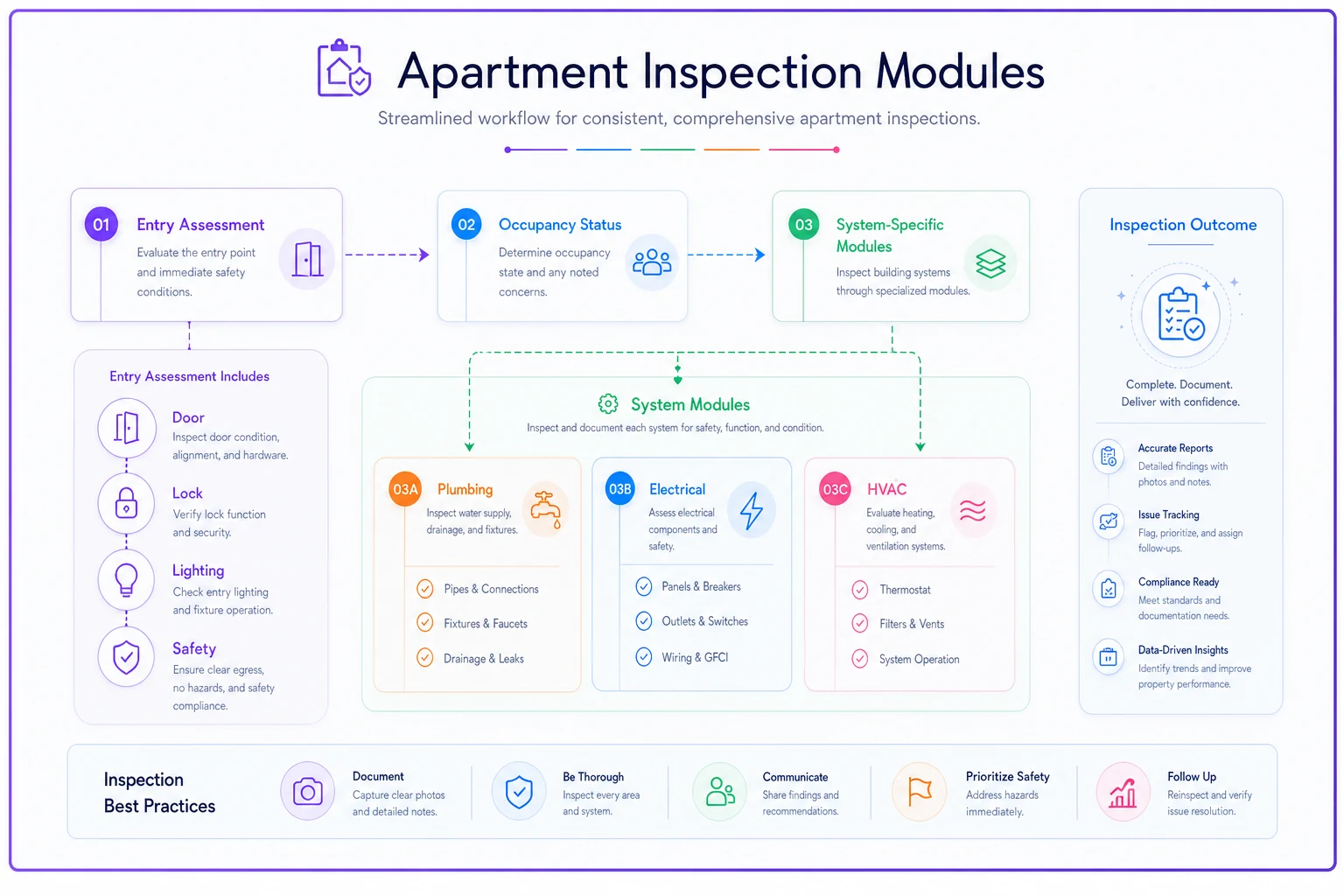
Entry Assessment Module (always runs)
-
Door condition
-
Lock functionality
-
Entry lighting
-
Safety hazards
Occupancy Status Module (conditional)
If occupied → tenant communication protocol If vacant → detailed condition assessment If recently vacated → damage documentation protocol
System-Specific Modules (triggered by entry assessment)
-
Plumbing module (if water issues noted)
-
Electrical module (if electrical issues noted)
-
HVAC module (if comfort complaints or seasonal check)
Each module is self-contained with completion criteria. Inspectors finish entire cognitive chunks before moving on, reducing the mental overhead of tracking partial progress across multiple areas.
Conditional flows that prevent tunnel vision
Linear checklists create tunnel vision. Inspectors get focused on completing the next item and miss important connections. Conditional flows fix this by making checklists responsive to actual findings.
You don't need complex branching for every scenario. You need smart triggers at decision points.
Pest control inspection: initial module covers entry points and activity signs. Finding droppings triggers identification module—size, shape, location—that determines pest type. Based on identification, system routes to appropriate treatment protocol. No flipping through pages trying to remember chemical restrictions for different species.
-
Equipment type variations
-
Severity thresholds
-
Regulatory requirements
-
Safety escalations
Identify natural break points where conditions change required checks.
Decision trees without the paralysis
Decision trees in inspection checklists often fail because they try covering every scenario. Inspectors spend more time navigating the tree than performing inspections.
Effective decision trees follow one rule: no more than three levels deep, no more than three options per branch. Beyond that, you're not helping inspectors make decisions—you're making them for them, leading to checkbox compliance rather than actual inspection.
Fire safety inspection decision tree:
Level 1: System type?
-
Wet sprinkler → Module A
-
Dry sprinkler → Module B
-
Special hazard → Module C
Level 2: Deficiency found?
-
Yes → Severity assessment
-
No → Continue standard checks
Level 3: Severity level?
-
Critical → Stop work protocol
-
Major → Detailed documentation module
-
Minor → Note and continue
Three decisions maximum before inspectors return to executing specific checks. Modules handle complexity, not decision trees.
Testing your modular approach
Most inspection teams never test their checklists. They build, deploy, and hope. Modular checklists let you test variations without overhauling everything.
One facilities management company tested HVAC inspection modules:
| Version | Sequence | Issues Found | Follow-ups Required |
|---|---|---|---|
| A | Traditional (electrical → mechanical → refrigerant → airflow) | Baseline | Baseline |
| B | Diagnostic (airflow → temperature → mechanical → electrical) | +20% | +15% |
30-day test across similar properties. Version B caught roughly 20% more issues requiring follow-up. The diagnostic sequence helped inspectors identify problems earlier, leading to more thorough investigation of related components.
Modular structure meant testing without retraining everyone. Version A inspectors had the same checks, different order. After confirming Version B effectiveness, they updated modules across all properties quickly.
Test module sequences, conditional triggers, decision branches, even check phrasing. Keep tests focused. Change one variable. Measure specific outcomes—error rates, completion times, follow-up issues.
Ready-to-implement modular templates
After analyzing patterns across different inspection types, certain modular structures consistently improve accuracy while reducing cognitive load:
Equipment-Based Structure
Core Assessment Module
-
Equipment identification
-
Operational status
-
Immediate hazards
-
Triggers specialty modules based on equipment type
Manufacturer-Specific Modules
-
Loaded based on equipment ID
-
Model-specific checks
-
Known issue protocols
-
Technical specifications
Condition-Based Modules
-
Normal operation checks
-
Degraded performance diagnostics
-
Failure documentation
Works well for inspections involving multiple equipment types where each requires different expertise. Inspectors only see checks relevant to what's in front of them.
Regulatory Compliance Structure
Jurisdiction Module
-
Loads based on location
-
Local code requirements
-
Updates with regulatory changes
Baseline Compliance Module
-
Universal safety checks
-
Documentation requirements
-
Standard operating conditions
Violation Response Module
-
Triggered by non-compliance findings
-
Remediation timelines
-
Required notifications
-
Specific code references
Helps teams operating across multiple jurisdictions maintain compliance without memorizing varying requirements.
Progressive Inspection Structure
Quick Assessment Module (5 minutes)
-
Visual inspection points
-
Immediate safety concerns
-
Determines if full inspection needed
Standard Inspection Modules (20-30 minutes)
-
Triggered if quick assessment passes
-
System-by-system evaluation
-
Performance measurements
Deep Diagnostic Modules (as needed)
-
Triggered by anomalies
-
Troubleshooting steps
-
Root cause analysis protocols
Prevents spending 45 minutes on equipment that could be flagged problematic in five minutes.
The operational change you'll notice
When you shift to modular inspection checklists, the change is immediate. Inspectors stop asking "what page was that on?" and focus on actual inspection work.
Training new inspectors becomes faster because you're teaching modules, not memorization. HVAC inspector masters refrigerant module before moving to electrical systems, rather than absorbing a 200-point checklist at once.
Quality control improves because you can track performance at module level. If errors cluster in specific modules, you know exactly where to focus training or redesign efforts.
The biggest change: inspectors feel better about their work. Modular checklists respect their expertise by matching natural workflow. They're not fighting the tool to do their job.
Making the switch without operational disruption
Converting existing checklists to modular structures doesn't require shutting down operations. Start with highest-volume or highest-risk inspection types. Map natural modules based on actual workflow, not documentation organization.
Pick one inspection type. Break into 5-7 core modules. Each module should represent 5-15 minutes of focused work on related components or conditions. Test with experienced inspectors first—they'll identify if modular breaks match reality.
Start with your highest-volume or highest-risk inspection type and break it into 5–7 modules you can test quickly.
Modern inspection software with AI automation can manage modular checklist complexity without custom development. These systems automatically route inspectors through appropriate modules based on conditions, equipment types, and findings. They handle conditional logic and decision trees while presenting clean, focused interfaces showing only relevant checks.
AI components learn from inspection patterns, suggesting module improvements based on usage data. If inspectors consistently jump between two modules, the system recommends combining them. If conditional triggers never activate, it flags them for removal.
This isn't about replacing human judgment with AI. It's using AI to reduce administrative and cognitive overhead of managing complex modular systems, letting inspectors focus on inspection work.
Mistakes that kill modular adoption
The biggest failure: over-modularization. Teams get excited and create 50 micro-modules for what should be 8-10 substantial sections. This creates more cognitive switching, not less.
Another mistake: making modules too rigid. Inspection work requires flexibility. Modular structure should guide inspectors, not trap them. Always include "additional observations" capability for findings outside the modular structure.
Don't forget reporting. Modular checklists can complicate data aggregation if poorly designed. Each module needs consistent data structure and naming conventions. Otherwise, you solve field inspection problems but create back-office reporting nightmares.
What this means for your program
Modular inspection checklists represent a shift from document completion to decision support.
Operational impact appears everywhere: fewer missed items, faster training, better compliance rates, inspectors who trust their tools instead of working around them.
Start small. Pick your most problematic inspection type—highest error rates or most field team complaints. Map natural modules. Test with a small group. Measure differences. Results typically show within the first month.
Your inspection teams already think in modules. They already follow conditional logic and decision trees. The question isn't whether to modularize checklists, but how quickly you can align tools with how inspection work actually happens.
Ready to modernize your inspection process?
Join 500+ inspection teams using Chekzly to reduce paperwork, improve compliance, and accelerate reporting.