

A regional restaurant chain with 47 locations got slapped with $180,000 in health code violations last summer. Their kitchens were clean. Food was safe. But inspection teams were using three different versions of the same temperature monitoring checklist.
Corporate had updated critical holding temperatures in May. Some locations implemented it. Others missed the memo entirely. The ones that did catch it started on different dates. When health inspectors compared records across sites during routine audits, the inconsistent data patterns looked like systematic non-compliance.
It wasn't. Just terrible checklist version control.
This mess happens constantly in multi-site operations. Safety managers update fall protection requirements. Quality teams add contamination checks. Compliance officers remove obsolete regulatory items. Without proper versioning, these changes create chaos instead of clarity.
The hidden complexity of inspection checklist changes
Most inspection managers think checklist updates are simple. Change the form, notify the team, done. But operations are way messier than that.
When you modify a single inspection item, that change needs to reach every inspector's device. Historical data needs clear separation between old and new versions. Training materials need updates. Reporting templates break. Automated workflows fail. And when something goes wrong, you better know exactly which version was used for every inspection.
A manufacturing facility updated their equipment calibration checklist to add tolerance ranges for pressure gauges. Their reporting system couldn't parse the new data format. For three weeks, calibration data vanished into a digital void. When the FDA inspector requested records, they had to manually reconstruct everything from paper backups and inspector notes.
The problem gets worse when you're managing multiple checklist types across different regulations. Environmental inspections follow EPA guidelines that update quarterly. Safety checklists track OSHA standards that change annually. Quality control forms reflect ISO requirements that evolve every few years. Each has different compliance timelines, documentation requirements, and rollback rules.
Why traditional document management fails for inspection checklists
Standard document control treats checklists like static files. Version 1.0 becomes 1.1 becomes 2.0. Basic numbering, change logs, approval workflows. But inspection checklists aren't documents—they're operational tools that generate compliance data.
Eliminate inspection delays and errors.
Chekzly helps you plan, execute, and document inspections efficiently and accurately.
- Real-time inspection tracking
- Automated report generation
- Compliance and checklist management
No credit card required
The difference matters. When a construction company updates their scaffold inspection checklist, they're not just changing a form. They're modifying data collection protocols, field workflows that inspectors know by heart, compliance evidence that regulators expect in specific formats, historical baselines for trend analysis, and integration points with reporting systems.
A property management company overseeing 200+ buildings added indoor air quality parameters to their monthly inspection checklist. Version 2.0 went live on the first.
By day three, everything broke. Inspectors in older buildings couldn't complete the new sections—no testing equipment. The reporting dashboard crashed on the new data fields. Historical comparisons became useless since previous months had no air quality data. When they tried rolling back to the old version, three days of partially completed inspections disappeared.
Building a versioning system that actually works
Effective checklist version control starts with understanding that you're managing three distinct timelines: checklist design, implementation, and compliance. These never align perfectly.
Version tagging structure
Forget simple sequential numbering. You need semantic versioning that captures the magnitude and type of change:
Major versions (X.0.0): Regulatory requirement changes, new compliance sections, structural reorganization
Minor versions (0.X.0): Additional inspection points, clarified instructions, expanded data fields
Patch versions (0.0.X): Typo fixes, formatting adjustments, cosmetic changes
But you also need compliance markers. A food safety checklist might be version 3.2.1-FDA2023-FSMA. This tells you exactly which regulatory framework it addresses.
Effective dating that prevents chaos
Never implement checklist changes immediately. You need staged rollouts with clear transition periods:
Start with a small pilot group during the soft launch to catch issues before wide deployment.
A medical device manufacturer uses this timeline for critical quality inspections:
-
Day 0
Change announced via system notification
-
Days 1-5
Training materials released, Q&A sessions held
-
Days 6-10
New version available for practice runs
-
Day 11
Hard cutover at shift change
-
Days 12-40
Old version viewable but not usable
-
Day 41
Old version archived
Change logs that tell the real story
Most change logs are useless. "Updated Section 3.2" tells you nothing. Effective logs capture what changed, why it changed, who approved it, which sites are affected, what training inspectors need, and which reports might break.
Here's an actual change log entry that prevented an audit disaster:
``
Version 4.1.0 - March 15, 2024
Change: Added benzene exposure monitoring to chemical storage inspection
Reason: New OSHA PEL (Permissible Exposure Limit) effective April 1, 2024
Approved by: Sarah Chen, EHS Director
Impact: All facilities with paint/solvent storage areas (Sites 1, 3, 7, 9)
Training: 2-hour hazmat refresher required before use
Dependencies: Lab reporting system needs new test code (BNZ-24)
Rollback trigger: If >20% of inspections fail completion
``
The change log above packs what you need for audit defense: scope, approvals, impact, training, dependencies, and rollback triggers.
The graphic below shows the staged rollout and rollback workflow.
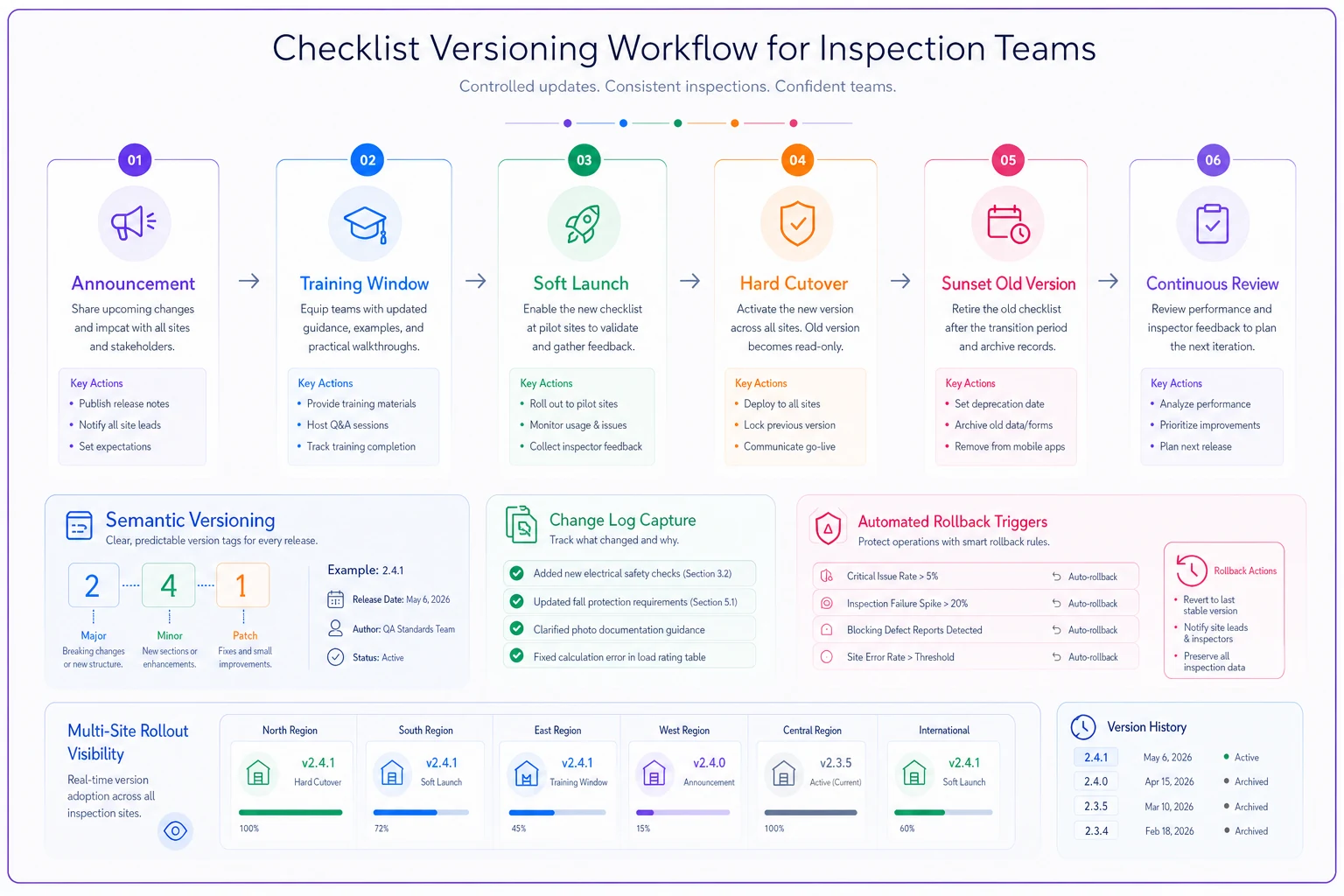
Keep semantic tags, effective dates, and rollback triggers clear so systems and auditors always know which version applied when.
Communication cadence that keeps everyone aligned
You can't email checklist changes and hope for the best. Field teams need structured communication that respects operational realities.
The most effective pattern follows a weekly cascade:
Monday morning: Version announcement digest covering what's changing this week, what's coming next week, and training sessions scheduled. Wednesday check-in: Implementation status including adoption rates by team, common questions or issues, and clarifications needed. Friday summary: Week close-out with completion metrics, problems encountered, and Monday's priorities.
But this only works with differentiated channels for different urgencies. Critical safety changes get pushed through multiple channels—system alerts, text messages, morning huddle topics. Minor updates might only appear in the weekly digest. Compliance-driven changes trigger formal acknowledgment workflows.
| Change Type | Primary Channel | Secondary Channel | Acknowledgment Required |
|---|---|---|---|
| Safety Critical | SMS + In-app alert | Email + Huddle topic | Digital signature within 24hrs |
| Regulatory Required | Email + System notice | Team meeting agenda | Written confirmation within 72hrs |
| Process Improvement | Weekly digest | Team dashboard | None |
| Cosmetic/Minor | System changelog | None | None |
A chemical processing facility structures their communications this way:
Rollback rules tied to compliance needs
Sometimes checklist changes fail badly. Maybe the new version has unclear instructions. Perhaps it conflicts with local regulations. Or inspectors simply can't complete it effectively. You need predetermined rollback triggers and protocols.
Automatic rollback triggers
-
Completion rate drops below 80% for two consecutive days
-
Error rate exceeds 15% on any critical inspection item
-
Data validation failures hit 10% of submissions
-
Inspector overtime increases >25% due to checklist complexity
A nationwide retail chain discovered their new loss prevention checklist took 3x longer to complete than anticipated. When overtime costs hit $30,000 in the first week, automatic rollback kicked in.
Compliance-based rollback restrictions
Not all checklists can be rolled back freely. Some changes are regulatory mandates that must be implemented regardless of operational impact.
-
Mandatory/No rollback Required by law or regulation
-
Restricted rollback Requires executive approval and regulatory notification
-
Conditional rollback Allowed if alternative compliance method exists
-
Free rollback Internal process improvements with no external requirements
Document these restrictions clearly. When OSHA updates machine guarding requirements, you can't roll back just because inspectors find them confusing. But you can roll back your internal "efficiency improvements" that made the checklist worse.
Rollback execution protocol
Rolling back isn't just switching versions. You need to freeze all in-progress inspections, export any data collected under new version, revert to previous version across all systems, notify all active inspectors immediately, document rollback reason for audit trail, assess and remediate any compliance gaps, and plan corrective action for failed update.
Real-world versioning in action
A regional hospital network managing 12 facilities needed to update infection control checklists after a CDC guideline change. Different units had different risk profiles. ICU checklists needed immediate updates for ventilator protocols. Outpatient clinics could wait until the next quarter. Emergency departments needed a phased approach due to staffing constraints.
The solution: Multi-track versioning with overlapping timelines.
Track 1 (Critical care): Version 5.0.0-CDC2024-CRITICAL
-
March 1
Announcement with mandatory training links
-
March 5-7
Supervised practice runs during overlap shifts
-
March 8
Hard cutover for all ICU/CCU units
-
No rollback allowed (regulatory requirement)
Track 2 (Emergency): Version 5.0.0-CDC2024-EMRG
-
March 1
Initial communication
-
March 8-15
Voluntary early adoption for trained staff
-
March 16-22
Transition week with both versions available
-
March 23
Full cutover
-
Conditional rollback allowed with CMO approval
Track 3 (Outpatient): Version 5.0.0-CDC2024-OUT
-
March 1
Notification only
-
April 1
Training materials released
-
April 15
Soft launch
-
May 1
Mandatory adoption
-
Free rollback until May 15
The result? Zero compliance gaps, minimal operational disruption, and inspection data that clearly showed when each unit transitioned to new protocols.
Integration with inspection software
Modern inspection software should handle versioning automatically, but most don't. They treat checklists as templates that get updated in place, destroying historical context.
What you actually need is temporal versioning—the ability to know exactly which version of a checklist was used for every single inspection, forever. When an insurance company challenges a claim from two years ago, you need to prove your inspection followed the standards that existed at that time. When OSHA investigates an incident, they want to see the exact checklist version used on the day of the last inspection.
AI-powered operational software handles this automatically. Instead of manually tracking versions, effective dates, and change logs, the system maintains complete version genealogy. Every inspection is permanently linked to its specific checklist version. Changes propagate based on your rollout rules. Rollbacks execute cleanly without data loss.
AI automation can analyze the impact of checklist changes in real-time. Is the new version taking longer to complete? Are error rates increasing? Are certain teams struggling more than others? The system flags these patterns immediately, before they become compliance problems.
Building your version control framework
Start with these fundamental components:
Version repository structure:
-
Production versions (currently active)
-
Staging versions (under testing)
-
Archive versions (historical reference)
-
Draft versions (under development)
Metadata requirements for each version:
-
Version number and compliance markers
-
Effective date range
-
Approval chain and dates
-
Change summary and detailed log
-
Training materials and requirements
-
Rollback conditions and restrictions
-
Performance baselines (expected completion time, error rates)
Communication templates:
-
New version announcement
-
Training notification
-
Cutover reminder
-
Rollback notice
-
Post-implementation review
Performance metrics to track:
-
Adoption rate by team/location
-
Completion time comparisons
-
Error rates and data quality scores
-
Inspector feedback and confusion points
-
Compliance impact assessment
Start with these fundamental components:
The path forward
Checklist version control isn't about perfection. It's about predictability. Your field teams need to know which version to use, when changes are coming, and what to do if something goes wrong.
Organizations that excel at this treat checklist versioning as a critical operational capability, not an administrative afterthought. They invest in proper systems, clear protocols, and robust communication. They plan for rollbacks before they need them. They document everything with future audits in mind.
Most importantly, they recognize that inspection checklists aren't just forms—they're the foundation of compliance evidence. Every version change ripples through operations, affecting how work gets done, how data gets collected, and how compliance gets proven.
Get this right, and checklist updates become smooth operational evolutions. Get it wrong, and you're one audit away from discovering just how expensive version chaos can be. The stakes are too high for informal version control.
When the auditors arrive, "we're using the latest version" isn't good enough. You need to prove exactly which version was used, when, by whom, and why. Your version control system is what makes that proof possible.
When the auditors arrive, "we're using the latest version" isn't good enough. You need to prove exactly which version was used, when, by whom, and why. Your version control system is what makes that proof possible.
Ready to modernize your inspection process?
Join 500+ inspection teams using Chekzly to reduce paperwork, improve compliance, and accelerate reporting.