

That stomach-drop feeling when an auditor asks for records from eighteen months ago hits every inspection manager eventually. You know the inspection happened. Your field tech took photos. The report exists... somewhere. But after twenty minutes digging through folders named "Site Inspections March 2023 FINAL v3," you're sweating while the auditor scribbles notes.
Most inspection programs build their documentation systems backwards. They focus on getting inspections done and worry about retrieval later. By the time an audit happens, you're scrambling to piece together defensible records from scattered PDFs, orphaned photos, and Excel sheets that may or may not reflect what actually occurred in the field.
Auditors have gotten smart about finding weak points in inspection programs. They don't ask for random records anymore. They target edge cases—the emergency inspection from a holiday weekend, the follow-up during a system migration, the corrective action spanning multiple quarters. They know exactly where documentation systems break.
The metadata problem nobody talks about until it's too late
Your original folder structure worked great with twelve locations and one inspector. Site name, date, done. Then you added three more inspectors, expanded to forty sites, started doing different inspection types. Now you're drowning in files that look identical from the outside.
The volume isn't the killer—it's that nobody planned metadata taxonomy when the program started. You have hundreds of inspection reports with no systematic way to know which inspector conducted them, what type of inspection it was, whether corrective actions were required, or if follow-ups were completed. The information lives inside PDFs that require manual opening to understand.
One environmental compliance manager spent three full days preparing for an audit because their inspection records had zero useful metadata. Every single file had to be opened, reviewed, and manually cataloged into a spreadsheet just to answer basic questions about inspection coverage. The inspection work was perfect. The documentation existed. But without searchable metadata, it might as well have been locked in a filing cabinet underwater.
This gets exponentially worse with multi-format records. Your inspectors submit reports as PDFs, photos as JPEGs, videos as MP4s, and corrective action plans as Word documents. Each format handles metadata differently. Some strip location data. Others don't preserve timestamps reliably. Many inspection apps actually worsen this by converting everything to proprietary formats that lose critical metadata.
Why chain of custody fails when it matters most
Every inspection record tells a story, but most programs can't prove that story hasn't been edited. This isn't about fraud—it's about dozens of ways records get inadvertently altered during normal operations. Someone exports photos to resize them. An admin "cleans up" file names for consistency. An IT migration changes modification dates. Suddenly your evidence trail has gaps auditors love to exploit.
Eliminate inspection delays and errors.
Chekzly helps you plan, execute, and document inspections efficiently and accurately.
- Real-time inspection tracking
- Automated report generation
- Compliance and checklist management
No credit card required
A medical device manufacturer had pristine inspection documentation for their quality control process. Every device got inspected, photographed, and documented. But when FDA auditors arrived, they discovered all inspection photos had been bulk-processed through an image optimization tool that stripped EXIF data and changed timestamps. The inspections were real. The photos were authentic. But the chain of custody was broken, triggering major findings despite perfect actual compliance.
Chain of custody needs to account for the entire lifecycle of inspection media. From when a photo gets taken on a field inspector's phone to when it gets presented during an audit two years later, you need an unbroken trail showing the record hasn't been tampered with. This requires version control, access logs, and systematic backup procedures that most inspection programs never implement until after their first failed audit.
Device diversity complicates this further. Your inspectors use iPhones, Android devices, tablets, and sometimes actual cameras. Each device handles media differently. Some compress photos automatically. Others adjust timestamps based on timezone settings. Cloud storage services helpfully "optimize" your files without telling you. By the time records reach your central repository, the chain of custody might already have three weak links.
Building retrieval SOPs that actually work under pressure
The average inspection manager thinks retrieval means "being able to find files." Auditors think retrieval means producing specific records within minutes while demonstrating systematic control over your entire documentation system. That gap is where audit findings live.
Real retrieval SOPs need to handle edge cases nobody considers until an auditor asks. Can you find all inspections conducted by a specific inspector who left eight months ago? Can you produce all corrective actions related to a specific deficiency type across multiple sites? Can you show the complete history of a recurring issue including all follow-ups, verifications, and closures? These aren't hypothetical—they're actual audit requests that sink inspection programs.
Make metadata fields mandatory at the point of entry to prevent incomplete records during audits.
Your retrieval system needs multiple access paths to the same information. Organizing solely by date means you're dead if someone asks for all inspections of a specific type. Organizing only by location means you can't quickly show inspector qualifications and coverage. Organizing just by inspector means you can't demonstrate site compliance history. You need all three, plus cross-referencing ability.
Speed matters as much as completeness. Auditors judge your control systems based on how quickly and confidently you produce records. Taking forty minutes to find a routine inspection report signals weak document control even if you eventually find everything. Retrieval SOPs need specific time targets and clear escalation procedures when records aren't immediately locatable.
The hidden failure points in multi-site inspection programs
When inspection programs cover multiple sites, record management complexity explodes rather than grows linearly. Each site might have different inspection schedules, local requirements, and documentation standards. What works for your flagship location falls apart across twenty facilities in three states with different regulatory frameworks.
Consider a typical multi-site inspection cycle. Northeast facilities require monthly stormwater inspections during winter. Southwest sites need quarterly dust control documentation. Midwest operations have specific agricultural runoff requirements. Each inspector documents according to regional training, using different terminology for similar findings. During audits, you're trying to demonstrate consistent compliance across inconsistent requirements using inconsistently formatted records.
Coordination breakdown usually happens at handoff points. Field inspectors complete work and upload files... somewhere. Regional managers review reports... eventually. The central compliance team aggregates data... somehow. Each handoff introduces opportunities for records to get misfiled, metadata to get lost, or critical documentation to slip through cracks.
One program had inspection reports sitting in email attachments for weeks because nobody defined exactly how records should move from field to storage. Three weeks later, the issue is resolved and documented. But now you have multiple versions of the same inspection record—the original finding, the action plan, progress updates, and final verification. Without clear version control and relationship mapping, these related records scatter across your system like puzzle pieces in different boxes.
A practical taxonomy system that scales
Forget basic computer training folder structures. Inspection records need taxonomy systems supporting multiple simultaneous organization methods without duplicating files or losing relationships between records. This isn't about being fancy—it's about building systems that work when managing thousands of inspection records across dozens of sites with multiple inspectors.
Start with a three-tier classification system separating what, where, and when while maintaining connections between all three. Base level should be inspection type—routine, follow-up, complaint-driven, special circumstance. Second tier covers location data—not just site names but specific areas, systems, or equipment within each site. Third tier is temporal—but not just dates. Include inspection cycles, compliance periods, and regulatory deadlines.
| Classification Tier | Required Fields | Example Values |
|---|---|---|
| Inspection Type | Primary purpose, regulatory requirement | Routine monthly, Emergency response, Follow-up verification |
| Location Data | Site, area, specific equipment/system | Plant A - Tank Farm - Storage Tank B-7 |
| Temporal | Date, cycle period, compliance deadline | 2024-01-15, Q1 2024, Due: March 31 |
Your metadata fields need to be mandatory and validated at entry point. Optional fields stay empty. Free-text fields get filled with garbage. If inspectors can skip metadata entry or make up categories, they will. One program had seventeen different spellings of "preventative maintenance inspection" because everyone typed it slightly differently. Good luck searching for those records later.
Your taxonomy also needs controlled vocabularies for findings and corrective actions. When an inspector notes "visible emissions," "excess emissions," "opacity violation," and "smoke issue," are those four different problems or four ways of describing the same thing? Without standardized terminology, you can't track patterns, demonstrate improvement, or efficiently retrieve related records.
The inspection-to-audit pipeline nobody designs for
Most inspection programs treat audits like surprises that happen every few years. Smart programs build their entire documentation system around the assumption that someone will audit every single record eventually. This mindset shift changes everything about how you structure, store, and retrieve inspection records.
Consider the typical audit request: "Show me all inspection records for Tank B-7 from the last 24 months, including any corrective actions, follow-ups, and verification of closure." In poorly designed systems, this triggers a scavenger hunt across multiple folders, databases, and possibly several people's email accounts. In audit-ready systems, it's a single query producing a complete package in minutes.
Audit Package Creation Workflow:
-
Inspector completes field inspection using standardized forms
-
System automatically compiles inspection report with required metadata
-
All media files are attached with preserved EXIF data and chain of custody
-
Related procedures, checklists, and inspector credentials are linked
-
Package is sealed with digital signature preventing unauthorized changes
-
Automated reconciliation verifies package completeness
-
Package is indexed for rapid retrieval using multiple search criteria
This workflow becomes critical when you're facing six auditors wanting different record sets simultaneously. When EPA wants air emissions inspections, OSHA wants safety walkthroughs, and state regulators want stormwater documentation, you can't afford one person frantically assembling records. Each audit package should stand alone as a defensible record of what happened, when, by whom, and what came next.
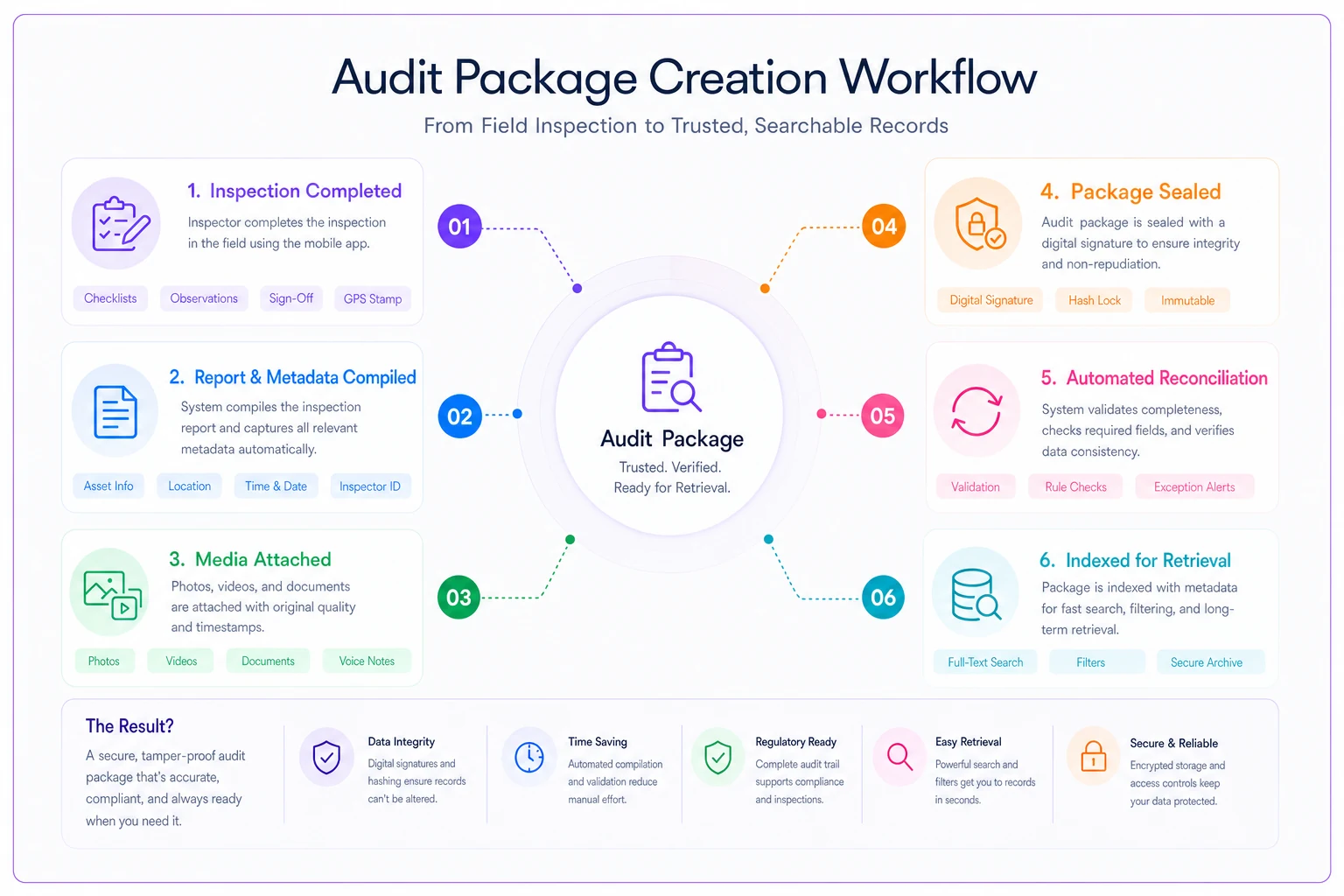
Here's a simple visual of the audit package creation workflow to reference during implementation.
Building retrieval controls that reduce findings
Auditors don't just penalize missing records—they cite programs for inadequate document control even when all records exist. The difference between "we have all our inspection records" and "we can demonstrate systematic control over our inspection records" is massive from a compliance perspective.
Your retrieval controls need multiple verification layers. First, can you prove records haven't been altered since creation? This requires checksums, digital signatures, or other technical controls that detect modification. Second, can you demonstrate that all required inspections actually happened? This means reconciliation between inspection schedules and completed records, with clear documentation of any deviations.
Third, can you show who accessed records and when? Audit logs aren't just for IT systems anymore.
One manufacturing client reduced audit findings by 75% simply by implementing monthly reconciliation. Every month, they systematically verified that all scheduled inspections were completed, all records were properly stored, all metadata was complete, and all corrective actions were tracked to closure. When auditors arrived, they didn't just have records—they had proof of ongoing verification that records were complete and controlled.
The retrieval system also needs clear escalation procedures when records can't be immediately located. "I can't find it" is an automatic finding. "Our SOP requires escalation to the compliance manager when records aren't located within 5 minutes, which has been initiated" shows control even when problems occur. Document your search procedures, time limits, and escalation paths. Make sure everyone knows them.
Practical implementation without disrupting operations
You can't shut down inspection operations for six months while rebuilding your documentation system. Implementation needs to happen while inspections continue, records keep accumulating, and audits potentially loom. This means careful phasing and clear transition procedures.
Start with new records going forward rather than trying to retroactively fix years of documentation. Implement your new taxonomy system for all inspections starting next month. Run parallel systems temporarily—maintain your old filing system while building the new one. This seems redundant, but it beats losing records during a botched migration.
Focus first on the highest-risk areas. If you've had audit findings related to specific inspection types or sites, prioritize getting those records under control. Build your audit packages for these critical areas first. Get your retrieval SOPs tested and refined where stakes are highest. Then expand systematically to routine inspections and lower-risk areas.
Training can't be an afterthought. Every inspector needs to understand not just what metadata to enter but why it matters for audit defense. Show them actual audit findings caused by poor documentation. Make the connection between thirty seconds of extra documentation today and avoiding major findings two years from now.
When people understand the downstream impact, compliance improves dramatically. But you need concrete examples, not theoretical problems.
The realistic cost of poor inspection documentation
The average audit finding related to inadequate inspection records costs $15,000-40,000 to resolve. That includes direct fines, consultant fees to develop corrective actions, staff time for implementation, and follow-up audit costs. For programs with systematic documentation problems, multiply that by the number of findings—organizations have paid over $200,000 to fix documentation issues when the actual inspection work was performed correctly.
The hidden costs hit harder. When inspectors spend 20-30% of their time searching for records, organizing files, or recreating documentation for audits, that's pure operational waste. A team of five inspectors loses roughly 400 hours annually just managing documentation inefficiently. At typical loaded labor rates, that's $35,000-50,000 yearly in lost productivity before considering audit risks.
Then there's reputation cost. When major findings hit public databases, contracts require disclosure, insurance rates adjust, and regulatory scrutiny increases. One food manufacturer lost two major retail contracts after inspection documentation failures became public through FDA warning letters. The actual food safety was never questioned—just their ability to prove it through documentation.
Operational disruption during audits compounds the problem. Normal inspection schedules get delayed while staff scrambles to assemble records. Emergency response capabilities get compromised when key personnel are stuck in conference rooms with auditors. Production schedules adjust around compliance activities that should run seamlessly in the background.
Integration between inspection systems and document management
The biggest mistake inspection programs make is treating record management as separate from inspection execution. Your inspectors use one system to conduct inspections, another to store photos, a third for reports, and somehow expect everything to come together coherently during audits. This fragmentation practically guarantees documentation problems.
Modern inspection programs need unified platforms handling the entire workflow from scheduling through audit defense. When an inspector completes a field inspection, the system should automatically compile the report, attach media with preserved metadata, link related records, and store everything with appropriate taxonomy tags. No manual filing, no "remember to upload photos," no hoping everything gets documented correctly.
AI-powered operational software can automatically extract metadata from inspection reports, identify related records, flag incomplete documentation, and predict which records auditors will likely request based on regulatory focus areas. It's not about replacing human judgment—it's about eliminating manual processes that lead to documentation failures.
Choose systems that maintain audit trails throughout the entire process. Every action should be logged—who scheduled the inspection, who conducted it, who reviewed it, who approved corrective actions, who verified closure. When auditors ask about any specific record, you should show its complete lifecycle from creation to current state without gaps or uncertainty.
The integration extends beyond just storing records. Your system needs to connect inspection findings to corrective action tracking, link follow-up inspections to original findings, and maintain relationships between related inspections across different sites or time periods. Without these connections, you're back to manual assembly during audits.
Moving forward with audit confidence
Building an audit-ready inspection records system isn't about perfection—it's about demonstrable control. Auditors understand that operations aren't flawless. What they won't accept is inability to show what happened, when it happened, and how you know your records are complete and accurate.
Start by honestly assessing your current documentation vulnerabilities. Can you retrieve any inspection record within five minutes? Can you prove records haven't been altered? Can you show all inspections for a specific parameter across all sites? If the answer to any of these is "probably not," you have work to do.
Fixing inspection documentation is mostly about systems and procedures rather than massive technology investments. Yes, modern inspection management platforms with built-in audit controls make life easier. But even basic improvements to taxonomy, retrieval procedures, and metadata standards can dramatically reduce audit findings.
Remember that inspection records aren't just about compliance—they're about proving your operational controls work. When documentation systems fail, it doesn't matter how good your actual inspection program is. Auditors can only evaluate what they can see, and what they can see is your documentation.
The goal isn't building a system that never has issues. It's building a system where issues are visible, controlled, and correctable before they become audit findings. When your inspection records can tell their complete story—from field execution through audit defense—you've built something that actually protects your operation rather than just documenting it.
Ready to modernize your inspection process?
Join 500+ inspection teams using Chekzly to reduce paperwork, improve compliance, and accelerate reporting.