

Most inspection software demos look great. The checklist flows smoothly, the report pops out as a polished PDF, and the salesperson taps through a tablet like everything's seamless. Then you deploy it to forty inspectors working in basements, parking garages, and rural sites with no signal — and half your core requirements quietly fall apart.
This guide skips the feature parade. It focuses on five platforms that handle the five capabilities that actually break programs when they're missing: offline mobile capture, checklist versioning, automated PDF report generation, RBAC audit logs, and common integrations. If a tool fails any of these, it doesn't make the shortlist, no matter how nice the dashboard looks.
I'll walk through the evaluation method first — because how you test matters more than which vendor you pick — then give you a compact comparison, procurement language, and a pilot checklist you can run in two weeks.
Why these five capabilities, and not the other forty on the feature sheet
Vendors love to list 200 features. In practice, inspection programs live and die on a much shorter list. These five are the ones that generate support tickets, audit findings, and quiet inspector workarounds when they're weak.
-
Offline mobile capture — because the moment an inspector loses a half-day of fieldwork to a sync failure, trust in the tool evaporates and people go back to paper.
-
Checklist versioning — because an inspection filed against last quarter's checklist, with no record of which version was used, is an audit liability.
-
Automated PDF report generation — because manual report assembly is where turnaround time goes to die.
-
RBAC audit logs — because "who changed this result, and when" is the first question any auditor or legal team asks.
-
Common integrations — because inspection data trapped in one app is data your asset management, CMMS, or BI stack can't use.
The pattern across programs that stall is almost never a missing exotic feature. It's one of these five being technically present but operationally weak. "We support offline" can mean full read-write caching, or it can mean "you can view a blank form but not save photos." Those are wildly different realities in the field.
The evaluation methodology (test these, don't trust the slide)
Before you look at any vendor, agree internally on how you'll score them. Here's the method that separates real capability from marketing.
Eliminate inspection delays and errors.
Chekzly helps you plan, execute, and document inspections efficiently and accurately.
- Real-time inspection tracking
- Automated report generation
- Compliance and checklist management
No credit card required
-
Define a "field-worst-case" test. Take your most complex checklist, load it onto a mid-range Android device, enable airplane mode, and complete a full inspection including 10–15 photos and a signature. Walk out of coverage, come back, and sync. Watch for data loss, photo compression, and timestamp drift.
-
Stress the versioning model. Publish a checklist, start an inspection, then publish a new version mid-inspection. Does the in-progress inspection stay on the old version? Can you see which version each completed record used? Can you roll back?
-
Inspect the generated PDF, not the on-screen report. Export a completed inspection and check: are photos embedded at usable resolution, do conditional fields render correctly, and is the version/inspector/timestamp metadata present on the document itself?
-
Pull the audit log and read it. Ask the vendor to show you the raw audit trail for a record that was edited after submission. Look for actor, timestamp, before/after values, and whether the log itself is tamper-evident or editable.
-
Integrate something real. Don't accept "we have an API." Push one inspection result into a test destination — a spreadsheet, a webhook endpoint, your CMMS sandbox — during the trial.
Run the field-worst-case test on the exact devices and OS versions your team uses, not on a vendor-provided tablet.
The single biggest mistake buyers make is scoring vendors on the demo environment instead of their own worst checklist on their own devices. A demo is a controlled lab. Your field is not.
The shortlist: five platforms worth evaluating
These are grouped by where they fit operationally, not ranked — because the "best" one depends entirely on your program's size and integration needs. The strengths and weaknesses below are the recurring ones teams actually run into, not exhaustive feature lists.
| Platform type | Offline capture | Checklist versioning | PDF automation | RBAC audit logs | Integrations | One-line strength | One-line weakness |
|---|---|---|---|---|---|---|---|
| SafetyCulture (iAuditor) | Strong, mature | Good (template history) | Strong, flexible | Role-based, reasonable logging | Large library + API | Fast to roll out, huge template ecosystem | Deep audit-log detail and granular RBAC can feel light for regulated enterprises |
| Fulcrum | Very strong offline/GIS | Versioned, developer-friendly | Good, templated | Role-based | Strong GIS/data integrations | Best-in-class for location-heavy field data | Report styling and non-technical config take more effort |
| GoCanvas | Solid | Moderate | Strong PDF output | Role-based | Decent business-app integrations | Clean forms-to-PDF workflow for SMB teams | Versioning controls are lighter for complex compliance needs |
| ProntoForms (TrueContext) | Strong | Good, with controlled publishing | Strong, conditional reports | Granular RBAC, solid logging | Enterprise connectors (ERP/CRM/field service) | Built for complex enterprise integration + governance | Pricing and setup lean enterprise, not casual |
| Form.com / enterprise EHS suites | Varies by config | Strong, governed | Strong | Enterprise-grade, detailed | Deep enterprise integrations | Governance and audit depth for regulated industries | Heavier implementation; overkill for small teams |
A note on how to read this table: the "weakness" column is not a dealbreaker — it's where you should focus your trial testing. If audit-log depth is your top concern and the tool is flagged for lighter logging, that's exactly where your pilot should dig.
When each type actually makes sense
When a template-rich, fast-deploy platform makes sense: You have distributed teams, lots of checklist variety, and you need people productive in weeks, not quarters. You can live with "good enough" audit granularity because your compliance exposure is moderate.
When a GIS/field-data-heavy platform makes sense: Your inspections are tied to locations, assets on a map, or spatial data. If you're inspecting utility poles, pipelines, or geographically dispersed infrastructure, location-native capture beats a generic forms tool every time.
When an enterprise governance suite makes sense: You're in a regulated industry, legal and procurement are actively involved in inspection outcomes, and your audit logs need to survive real scrutiny. The heavier implementation pays for itself the first time an auditor asks for a complete, tamper-evident change history.
When this is a bad idea: Buying an enterprise suite for a six-person team. Small programs regularly drown in configuration overhead because someone bought for the org they hope to be in five years instead of the one they run today. Match the tool to your current operational complexity plus roughly 18 months of growth — not your aspirational roadmap.
A realistic buyer scenario with numbers
A mid-size facilities inspection group — around 25 inspectors across a dozen sites — was running on a mix of paper and a lightweight forms app with no real versioning. Report turnaround averaged three to four days because someone in the office was manually assembling photos and findings into PDFs. Audit prep was a scramble; they couldn't reliably say which checklist version a given inspection ran against.
During evaluation they ran the field-worst-case test and knocked out two candidates immediately: one dropped photos on sync, the other couldn't show which version a completed inspection used. That single test did more than three vendor calls combined.
After moving to a platform with proper offline caching and automated PDF generation, report turnaround dropped to same-day for most inspections. Audit prep that used to eat a few days per cycle became a filtered export. Nothing dramatic happened to headcount — the real win was that inspectors stopped losing fieldwork to sync failures, and the ops lead stopped rebuilding reports by hand. The payback wasn't a flashy metric. It was the quiet disappearance of a recurring weekly headache.
Procurement checklist: clauses to get in writing
Don't let capability claims live only in a sales deck. Pin them to the contract.
-
Offline data integrity guarantee — written confirmation that in-progress inspections (including photos and signatures) persist locally and sync without loss after extended offline periods.
-
Version-of-record clause — every completed inspection must permanently record the exact checklist version used, and that association must be exportable.
-
Audit-log export and retention — you can export the full change history (actor, timestamp, before/after) for any record, and logs are retained for your required period.
-
PDF fidelity acceptance criteria — generated reports must embed full-resolution photos and all conditional fields, with version/inspector/timestamp on the document.
-
Integration access — API/webhook access included in your tier, with rate limits and sandbox access stated explicitly.
-
Data portability on exit — you can export all inspection data and media in a usable format if you leave, within a defined timeframe.
-
Downtime and support SLA — response times for critical issues, especially anything that blocks field capture.
The clause people most often forget is the last-day-of-contract one: data portability. It costs nothing to negotiate up front and is nearly impossible to add after you're locked in.
A two-week pilot plan you can actually run
A pilot isn't a longer demo. It's you doing your real work in the tool, on purpose, with a few deliberate failure tests built in.
-
Days 1–2 Build one real, complex checklist in the tool. Note how long config takes and whether a non-developer could reasonably do it.
-
Days 3–5 Put it on your actual field devices. Run the airplane-mode worst-case test twice, on different device models if you can.
-
Days 6–7 Publish a new checklist version mid-inspection and confirm the versioning behavior matches what the salesperson claimed.
-
Days 8–9 Have two inspectors each complete five to ten real inspections. Export the PDFs and review fidelity line by line.
-
Days 10–11 Edit a submitted record, then pull the raw audit log and verify it captured the change properly.
-
Days 12–13 Push inspection data into one downstream system via API or webhook.
-
Day 14 Debrief with the inspectors who used it — not just management. Field adoption is where tools quietly succeed or fail.
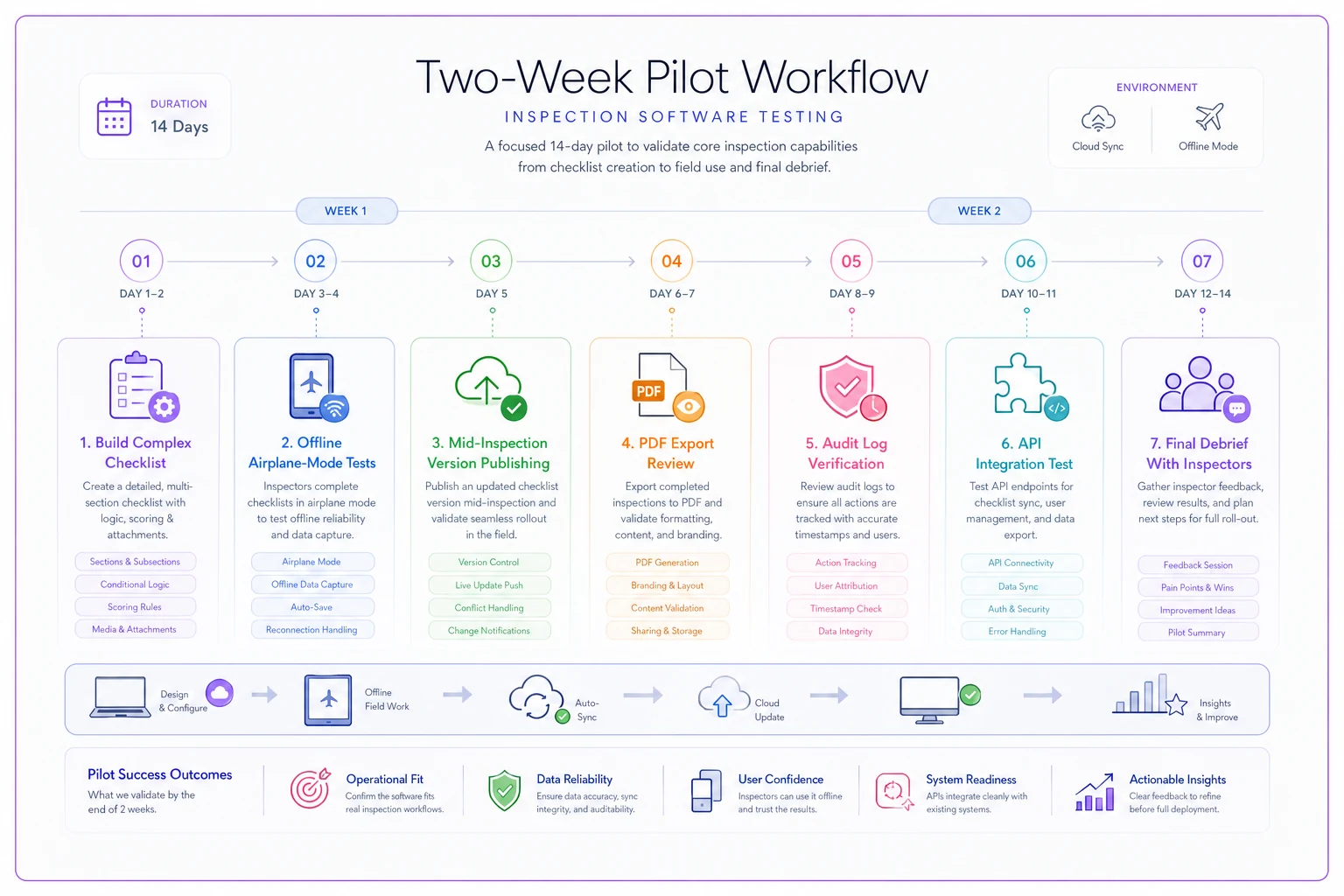
Score each step pass/fail against your written criteria, not on vibe. A tool that "felt nice" but failed the offline and audit-log tests is a future support ticket, not a purchase.
The quiet failure modes to watch for
A few patterns show up repeatedly when programs pick the wrong tool:
-
"Offline" that means view-only. The form opens offline but can't save rich media reliably. You find out the first rainy week in a parking structure.
-
Versioning that overwrites. A new checklist version silently changes how old reports render, so a reprinted historical inspection no longer matches what was actually filled out. That's an audit finding waiting to happen.
-
Audit logs you can't export. The log exists in the UI but there's no clean export, so proving change history to an auditor becomes a screenshot exercise.
-
Integrations gated behind a paid tier. The API is real, but it's locked behind a price jump nobody mentioned during evaluation.
Catch these in the pilot and they cost you two weeks. Catch them after signing and they cost you a full renewal cycle of workarounds.
Bringing it together
The tools on this shortlist are all legitimate — the right pick depends on your program's size, how location-dependent your inspections are, and how much audit scrutiny you actually face. What protects you isn't picking the "top" vendor; it's testing the five core capabilities against your own worst checklist on your own devices, then pinning the claims into your contract.
If you're also thinking about staffing and capacity as you roll out new tooling, the hiring and operations context in Stronger August Jobs Report: 6 Practical Moves Inspection Managers Should Make Now pairs well with this guide — tooling decisions and team capacity decisions tend to land at the same time, and it helps to think through them together.
Run the field-worst-case test before anything else. If a platform survives offline capture, versioning, PDF fidelity, audit-log export, and a real integration — on your hardware, with your data — you've already done more diligence than most teams do before signing a multi-year contract.
Ready to modernize your inspection process?
Join 500+ inspection teams using Chekzly to reduce paperwork, improve compliance, and accelerate reporting.