


Most redaction problems don't show up when you redact. They show up eighteen months later, when a regulator or opposing counsel asks for the original file and you either can't produce it or you produce something so scrubbed it proves nothing. That gap — between protecting personal data and keeping evidence that actually holds — is where inspection teams keep getting hurt.
Inspection PII redaction sits in an awkward spot. Your inspectors are capturing faces, license plates, badge numbers, home addresses on utility inspections, patient info on facility walkthroughs, employee names on incident photos. All of it needs handling. But redact too aggressively and you've destroyed the chain connecting a finding to a place, a time, and a person who signed off. Redact inconsistently and you've got a discovery nightmare where half your files leak PII and the other half are unusable.
This is a comparison piece, because the core decision most teams get wrong is what gets automated and what stays manual. Get that split right and everything downstream — metadata, audit statements, retention — falls into place.
The two failure modes nobody talks about
There are really only two ways this goes wrong, and they're mirror images.
Over-redaction that destroys evidence. A team sets up automated blur-everything rules, runs every photo through a face-and-text detector, and ships it. Six months later a slip-and-fall claim comes in. The inspection photo that would've shown the wet-floor sign was present has a blurred region right where the sign was, because the detector flagged the sign text as PII. Now the photo is worthless as evidence, and worse, you can't prove what it originally showed because the original was purged under an aggressive retention rule.
Under-redaction that leaks personal data. The opposite team decides redaction is too risky to automate, so everything is manual. Inspectors are supposed to blur faces before upload. Most do. Some forget. One employee's face and name badge end up in a package shared with a third-party contractor, and now you've got a privacy complaint and a policy that clearly wasn't followed — which looks worse than having no policy at all.
The pattern across both: teams treat redaction as a single decision instead of a set of decisions with very different risk profiles. Blurring a random bystander's face is low-stakes and highly automatable. Redacting the signature block on a compliance sign-off is high-stakes and should never be touched by an automated rule without a human in the loop.
Automated vs manual: draw the line by evidentiary weight
Stop asking "can this be automated?" and start asking "does this element carry evidentiary weight?"
Eliminate inspection delays and errors.
Chekzly helps you plan, execute, and document inspections efficiently and accurately.
- Real-time inspection tracking
- Automated report generation
- Compliance and checklist management
No credit card required
If an element is incidental — it happens to be in frame but doesn't prove or disprove anything about the inspection — automate the redaction. If an element is load-bearing for the finding, it goes through manual review, and the redaction decision gets documented.
Here's how that split tends to break down in practice:
| Element in the evidence | Evidentiary weight | Redaction approach | Why |
|---|---|---|---|
| Bystander faces, background people | None | Automated blur | Never referenced in findings, high privacy risk |
| License plates of uninvolved vehicles | None | Automated blur | Incidental, no bearing on inspection |
| Inspector's own signature/badge | High | Manual, usually retain | Proves who performed the work |
| Signage, labels, gauge readings | High | Manual review before any redaction | Often the actual finding |
| Subject's face when they ARE the finding | Case-by-case | Manual, documented decision | Depends on whether identity matters legally |
| Home addresses on utility/residential inspections | Medium | Automated flag, manual confirm | Sometimes needed to locate the asset |
| Employee names in incident reports | High | Manual, tied to legal guidance | Discoverability varies by jurisdiction |
The mistake most teams make is building one automated pipeline and running everything through it, including the load-bearing stuff. The detector doesn't know a wet-floor sign from a bystander's t-shirt slogan. It just sees text and blurs it.
A good automated layer handles the volume — the hundreds of incidental faces and plates that no human should be spending time on. A good manual layer handles the handful of decisions per package that actually matter. If your automated system is touching more than a small fraction of the evidentiary elements, your line is drawn wrong.
Minimal metadata retention without breaking the chain
Metadata is where the privacy-vs-evidence tension gets sneaky, because metadata isn't the obvious PII. It's the GPS coordinates that pin an inspection to someone's home. It's the device owner name embedded in a photo's EXIF data. It's the account username baked into a PDF's document properties.
Teams that build strong redaction pipelines for the visible content routinely forget the metadata, and then they've technically leaked a home address in the coordinates of a photo they carefully blurred a face out of.
Stripping all metadata isn't the answer either, because a lot of it is exactly what makes the evidence hold up. Capture timestamp, device fingerprint, and location are often the difference between a photo that survives a challenge and one that gets thrown out. The capture side of this is covered in the field SOP for admissible photos and video, and the redaction SOP has to stay consistent with whatever you decided there.
-
- Keep capture timestamp, inspector ID (your internal one, not a personal device account), asset/site ID, checklist version, hash of the original file
-
- Keep, but access-controlled precise GPS where the location IS the finding; generalize to site-level otherwise
-
- Strip device owner name, personal account usernames, embedded thumbnails that re-contain redacted content
-
- Strip any cloud-sync metadata that ties the file to a personal account
Automated metadata scrubbing should always regenerate or purge embedded previews to ensure an unredacted thumbnail isn't left behind.
That last point about embedded thumbnails catches people off guard. You blur a face in the main image, but the file format quietly stored a small preview thumbnail before your edit, and the unredacted face is still sitting in the file for anyone who knows to look. Automated metadata scrubbing should always regenerate or purge embedded previews.
The audit statement that makes redaction defensible
Redacting correctly isn't enough on its own. You have to be able to state what you did and why, in a way that a regulator or a court accepts.
An audit statement for a redacted package isn't a legal brief. It's a short, standardized record attached to the package that answers four questions:
-
What was redacted — categories, not the actual content ("bystander faces, three uninvolved license plates")
-
Why — the rule that triggered it ("privacy policy sec. 4, incidental persons")
-
How — automated vs manual, and who reviewed if manual
-
What the original state was — a hash of the pre-redaction original, held in access-controlled storage
That fourth point is the one teams skip and then regret. If you can prove the redacted version maps to a specific unmodified original via hash, you can defend the redaction as a faithful, non-destructive edit rather than tampering. Without it, opposing counsel gets to imply you altered evidence.
The audit statement also has to reconcile with your broader records system. If your retrieval SOPs can't pull the original on a legitimate legal request within a reasonable window, the whole scheme collapses. The mechanics of that live in your records architecture — the foundation for that is covered in building an audit-ready inspection records system. Redaction is a layer that sits on top of that, not a replacement for it.
A workable process, start to finish
Below is the flow that keeps the automated and manual layers from stepping on each other:
-
1. Capture and hash. The moment evidence lands, hash the original and store it in access-controlled cold storage. Nothing gets redacted until the original is preserved.
-
2. Automated first pass. Run incidental-PII detection — faces, plates, background text — but only flag, don't auto-commit, anything the detector rates as low confidence.
-
3. Manual review of load-bearing elements. A reviewer confirms nothing evidentiary got flagged and makes the case-by-case calls on subject faces, signage, and addresses.
-
4. Metadata scrub. Strip personal metadata, keep authenticity metadata, purge embedded thumbnails, regenerate previews.
-
5. Generate the audit statement. Auto-populate the what/why/how/hash, with the reviewer's name attached to any manual decisions.
-
6. Store redacted package and audit statement together; keep the original separate under legal-hold rules.
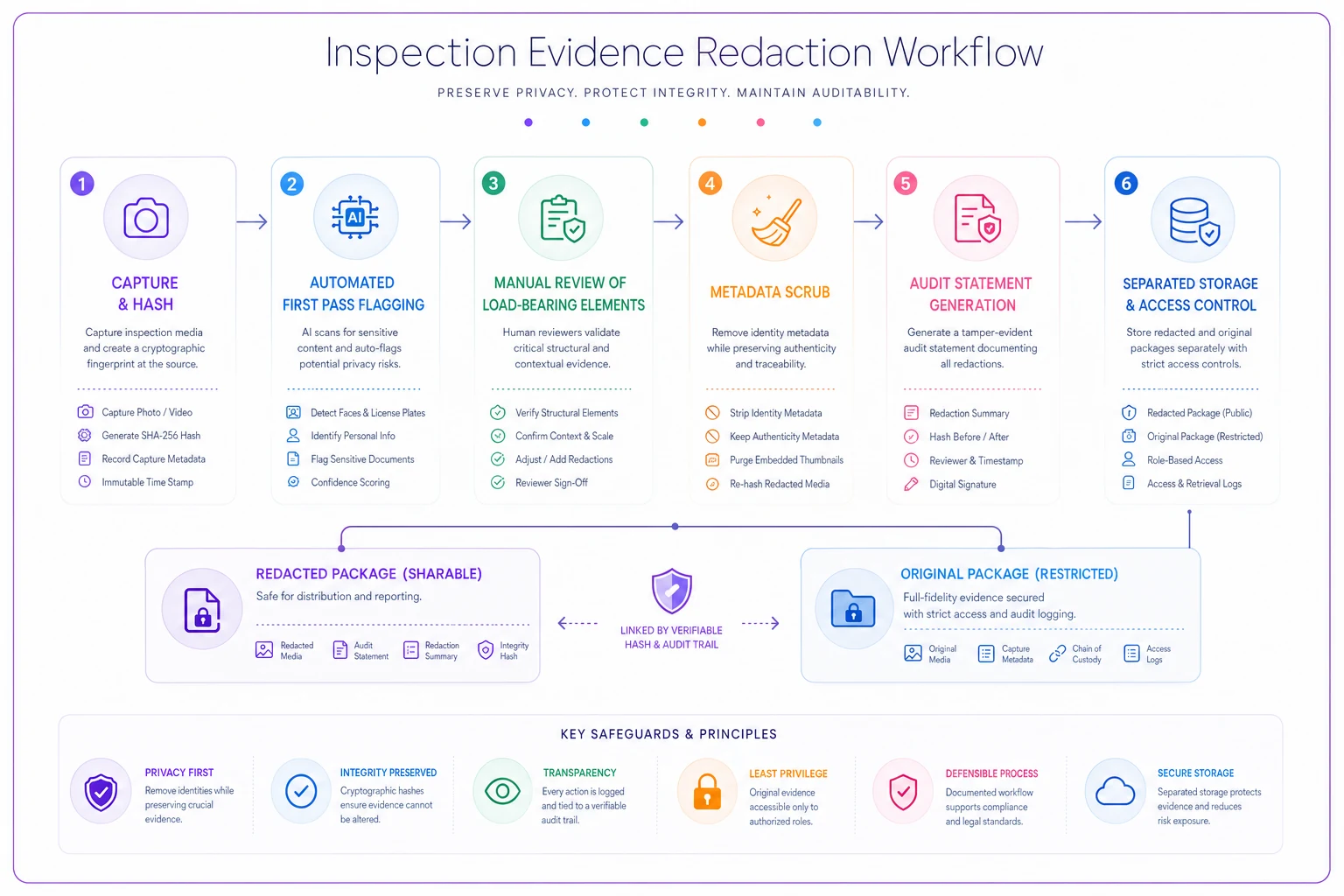
The order matters more than it looks. Hashing before redaction is what lets you prove faithfulness later. Manual review after the automated pass is what stops the detector from quietly destroying your best evidence.
When to lean automated, and when not to
Automated redaction makes sense when you're processing high volumes of routine inspections where the vast majority of PII is incidental — retail facility walkthroughs, road and infrastructure surveys, warehouse safety rounds. The privacy risk is real but the elements are predictable, and a human reviewing every license plate is a waste of time.
Manual-heavy redaction makes sense when the subject of the inspection is often a person, when identity is legally material, or when volume is low enough that human review isn't a bottleneck. Incident investigations, healthcare facility inspections tied to specific staff, anything likely to end up in litigation.
Who should not fully automate: any team that can't yet reliably preserve and retrieve originals. If you turn on aggressive automated redaction and purge originals under a tight retention rule before you've proven your retrieval works, you will eventually destroy evidence you needed. Fix retrieval first.
A quick real scenario
A regional facilities-inspection outfit — around a dozen inspectors covering commercial properties — was doing all redaction manually, blurring faces in a photo editor before upload. Per inspector, that was roughly 20–30 minutes a day, and the miss rate was the real problem: a spot audit found unredacted bystander faces in something like 1 in 8 packages, plus device-owner names sitting in the metadata of nearly everything.
They split the work. Automated blur for incidental faces and plates, manual review reserved for signage and any photo where a person was the subject, and a metadata scrub step that killed embedded thumbnails. Manual review dropped to a few minutes per package because reviewers only looked at flagged evidentiary elements instead of hunting every frame. The unredacted-leak rate on incidental PII went to near zero, and — this is the part that mattered in an actual records request months later — because they'd started hashing originals up front, they could hand over an unmodified original under legal hold and prove the redacted copy matched it.
Nothing about that was complicated. It was just drawing the automate/manual line by evidentiary weight instead of by convenience.
Pre-launch checklist
Before you turn any of this on:
-
- [ ] Originals are hashed and preserved before any redaction happens
-
- [ ] Retrieval of originals under legal hold is tested and works within your required window
-
- [ ] The automate/manual line is written down and mapped to evidentiary weight, not file volume
-
- [ ] Metadata retention list is explicit
keep authenticity, strip identity
-
- [ ] Embedded thumbnails and previews are purged or regenerated
-
- [ ] Audit statement auto-populates what/why/how/hash for every package
-
- [ ] Manual decisions carry a reviewer name
-
- [ ] Redacted files and originals live in separate, access-controlled storage
Redacted files and originals live in separate, access-controlled storage
Closing thought
The teams that get redaction right aren't the ones with the fanciest detection models. They're the ones who figured out early that redaction is two jobs — a high-volume automated job for incidental PII, and a small, careful, documented human job for anything that carries weight. Keep those jobs separate, preserve your originals before you touch them, and write down what you did. That's what lets you protect people's personal data without giving away the evidence you'll need when someone finally asks for it.
Ready to modernize your inspection process?
Join 500+ inspection teams using Chekzly to reduce paperwork, improve compliance, and accelerate reporting.