

Most inspection programs treat media storage as a binary: keep everything or delete everything after X years. That's the root of two separate, expensive problems. Either you're paying for hot storage on 4K video of a parking lot nobody will ever look at again, or you've compressed a crack-propagation photo into a smear and an auditor is asking why your evidence doesn't resolve to what your report claims.
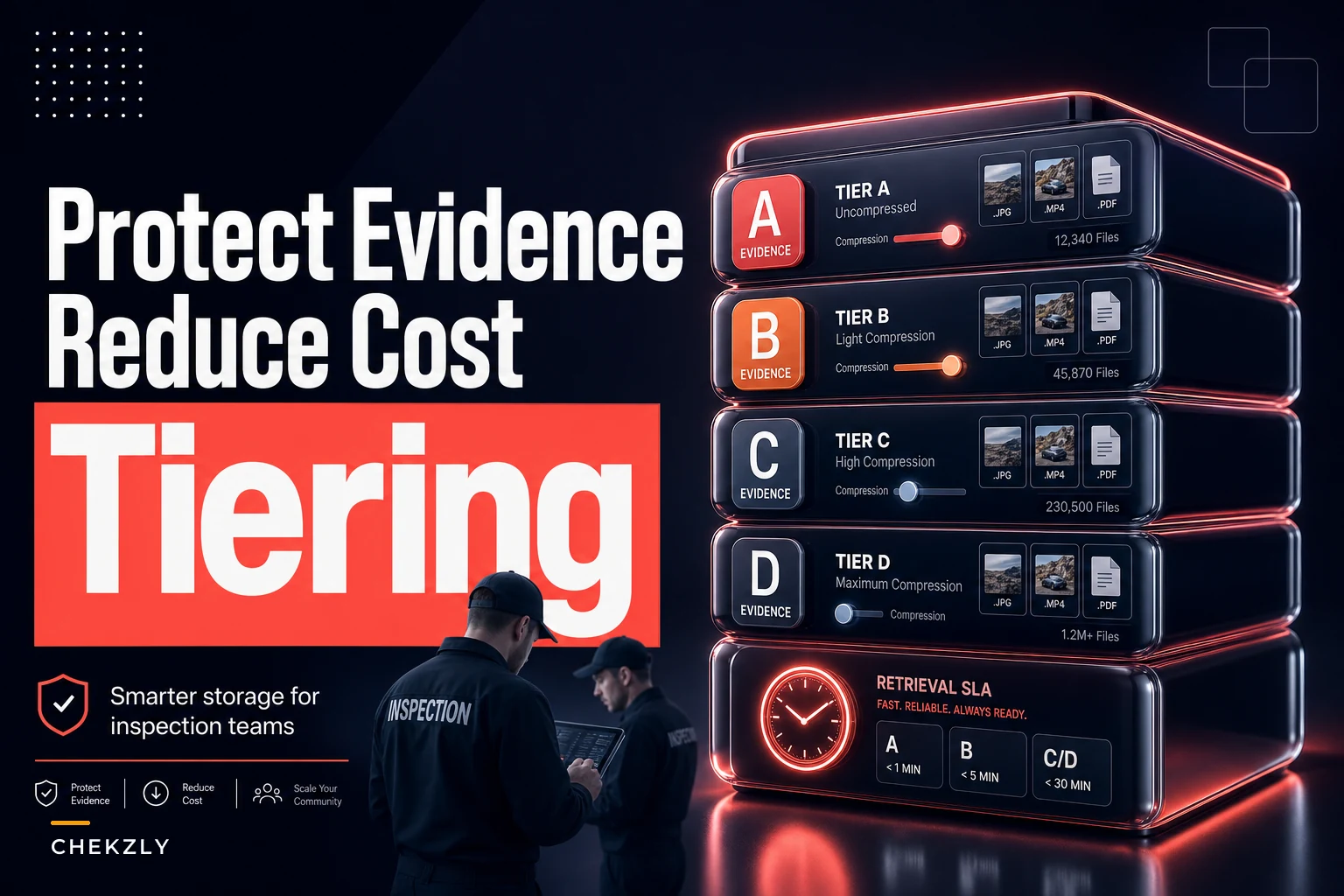
The fix isn't a bigger storage budget. It's a policy that grades evidence by how it will actually be used, then maps each grade to a compression setting, a storage tier, and a retrieval SLA. The audit-critical 10% stays legally defensible. The other 90% stops bleeding money.
This is a walk-through of how to build that mapping — not storage theory, but the actual decisions, with sample settings and templates you can adapt.
The real cost split most teams miss
There are two completely different reasons you retain inspection media, and they want opposite things from your storage policy. Almost nobody separates them cleanly.
Audit-grade retention cares about fidelity and chain-of-custody. The media has to survive a legal challenge years later. Compression that drops metadata or introduces artifacts can get evidence thrown out. Retrieval speed barely matters — if an auditor or attorney needs it, a 24–48 hour pull is usually fine.
Quick-review retention cares about speed and cost. A supervisor reviewing a close-out, a field tech checking last quarter's weld on the same asset, a QA sampler pulling 30 records — these people want the file in seconds, and they don't care if the photo is 1.2MB instead of 11MB.
When you run one policy for both, you overpay on one side and under-protect on the other. The pattern tends to look like this: a company keeps everything at capture resolution on fast storage "to be safe," then discovers 80% of their storage spend is sitting on media nobody has opened in 18 months — and the 5% that's genuinely audit-critical was never flagged as such, so it's buried in the same pile with no integrity checks happening.
Grade evidence before you touch a compression slider
The first move is grading. Not by file type, not by site — by evidential role. What job does this piece of media do if someone challenges the inspection?
Eliminate inspection delays and errors.
Chekzly helps you plan, execute, and document inspections efficiently and accurately.
- Real-time inspection tracking
- Automated report generation
- Compliance and checklist management
No credit card required
-
Grade A — Primary defect evidence. The photo or video that is the finding. Cracks, corrosion, out-of-tolerance readings, safety violations. If this degrades, the finding is indefensible.
-
Grade B — Supporting context. Wide shots, approach photos, serial-number/tag shots that establish location and identity. Important, but tolerant of moderate compression.
-
Grade C — Procedural/coverage. "Proof we were there and did the walk" media. Checklist completion photos, general area shots. High volume, low individual value.
-
Grade D — Transient/working. Duplicate angles, test shots, auto-captured sensor frames with no flagged anomaly. Candidates for aggressive compression or short retention.
Assign the grade at capture in the field workflow so grading doesn't become a retrospective cleanup task.
The grade gets assigned at or near capture, not six months later when you're trying to clean up storage. That's the operational discipline most programs skip. If your capture workflow already enforces naming and metadata standards — and it should, the field SOP for admissible photos and video covers how to make those survive audits — grading is a small additional field, not a new process.
One mistake worth flagging: teams try to auto-grade purely by whether a defect was logged. That misses Grade B identity shots, which are fine right up until an auditor can't confirm which asset the Grade A crack belongs to. Grade the context, not just the defect.
Mapping grade to compression and storage tier
Once you have grades, the mapping becomes fairly mechanical. The table below is a sample policy — treat the settings as starting points, validate against your own reviewers and regulators before locking anything in.
| Grade | Compression setting | Storage tier | Retention | Retrieval SLA |
|---|---|---|---|---|
| A — Primary defect | Lossless or near-lossless (JPEG q95+, H.264 CRF 18, originals preserved) | Hot + immutable/WORM copy | Full regulatory + legal hold window | 24–48 hrs (cold legal copy); seconds (working copy) |
| B — Supporting context | Visually lossless (JPEG q85, CRF 20–22) | Warm | Regulatory window | Under 1 hr |
| C — Procedural | Standard (JPEG q70–75, CRF 24–26, video down-rez to 1080p) | Cool | Shortened (often 1–2 yrs) | Same day |
| D — Transient | Aggressive (JPEG q55–60, thumbnail-only after 90 days) | Cold/archive | 90 days–1 yr | Best-effort |
A few things in this table matter more than they look.
Preserve originals for Grade A, always. Store the compressed working copy for fast review, but keep the untouched original in an immutable tier. The moment you only have a compressed version of defect evidence, you've capped the fidelity of anything you can ever prove. The storage delta on 5% of your media is small; the exposure of losing it is not.
Here's a simple workflow showing how grade maps to compression, storage tier, retention and retrieval SLA.
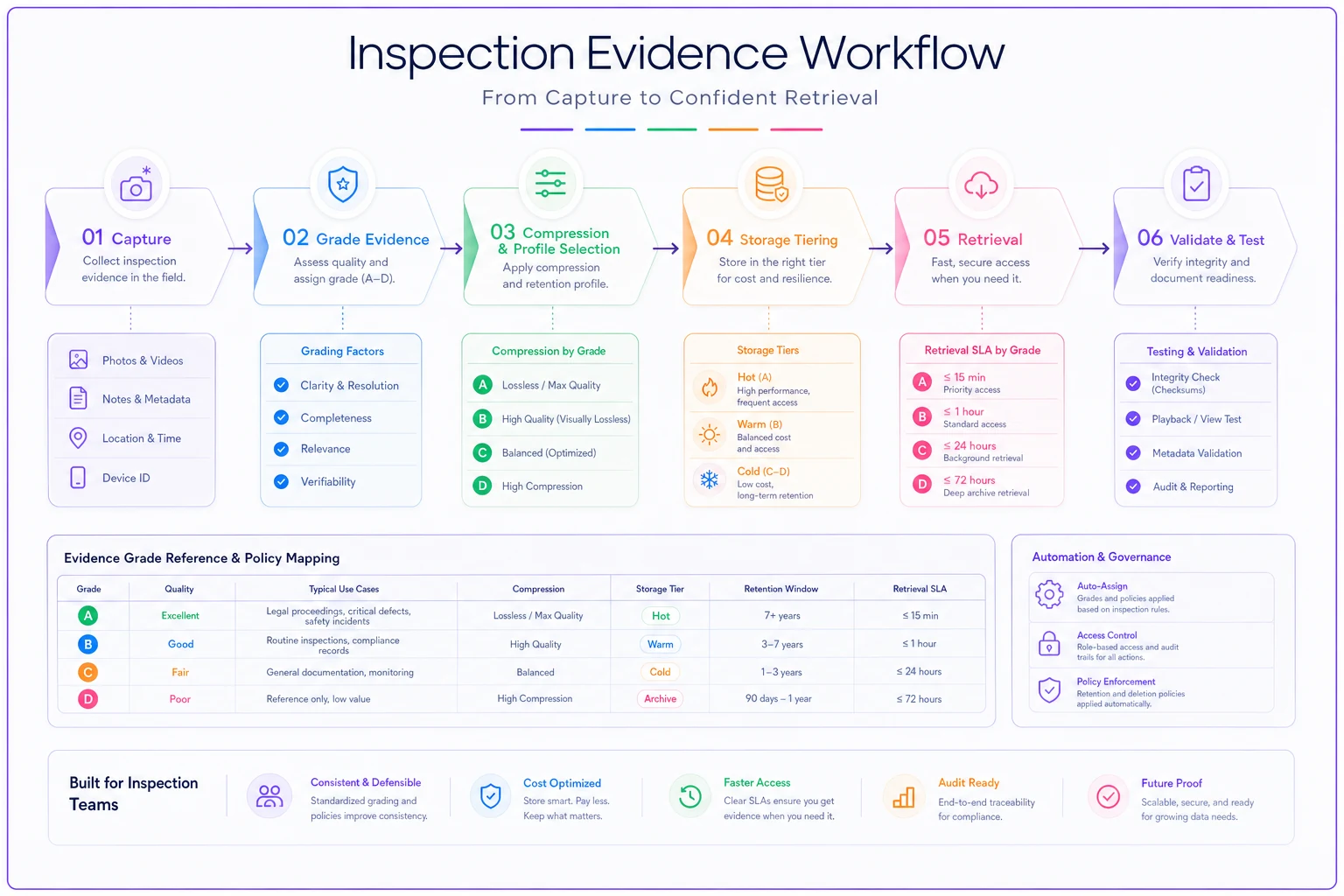
Use this workflow as a template for implementing your mapping.
"Visually lossless" is an actual target, not marketing language. For Grade B, JPEG q85 and video CRF ~20 keep the detail a reviewer needs while cutting file size 40–60% versus capture. That's where most of your quick-review cost savings come from — the large, numerous context files, not the handful of defect shots.
Down-rez video before you archive it. Grade C and D video is the single biggest storage line item in most sensor-assisted programs. A 4K walkthrough at 30fps is enormous and almost never reviewed at full resolution. Down-rezzing coverage video to 1080p at a reasonable bitrate often cuts footprint 70%+ with no practical review loss.
Retrieval SLAs: write them as commitments, not aspirations
The retrieval SLA is where cost and quality collide most directly. Cold storage is cheap to hold and expensive-and-slow to pull. If you dump audit-critical evidence into deep archive to save money, you can land in a situation where an auditor's 5-day window expires before your retrieval even completes. That's a self-inflicted finding.
Write SLAs per grade, and make them explicit commitments your storage setup can actually meet:
-
Define the trigger. Audit request, legal hold, investigation, routine QA pull, field re-check. Each has a different acceptable wait.
-
Set the clock per grade. Grade A legal copy
"available within 48 business hours of request." Grade B: "under 1 hour." Grade C: "same business day."
-
Assign the owner. Who executes the pull, who confirms completeness, who signs that chain-of-custody held. An SLA with no named owner is just a wish.
-
Test it on a schedule. Quarterly, pull a random Grade A record from cold storage end-to-end and time it. Most teams discover their "48 hour" archive is really a 5-day scramble involving a vendor ticket queue.
-
Record the retrieval itself. The act of pulling evidence is part of the evidence trail. Log who pulled what, when, and whether integrity checks passed.
That last point ties into retrieval SOPs more broadly. If you haven't formalized how records come back out under pressure, the audit-ready records system with metadata and retrieval SOPs is the companion piece to this storage policy. Storage tiering without retrieval discipline just moves the audit failure from "we lost it" to "we can't get it in time."
A real scenario: multi-site utility inspection program
A regional infrastructure inspection group running pole and substation inspections across roughly 40 sites was capturing everything at 4K — photos and video — and keeping all of it on fast cloud storage for a flat 7-year retention. Storage was running somewhere in the $4k–$5k a month range and climbing every quarter as capture volume grew.
When they actually looked at usage patterns, the split was stark. The vast majority of retrievals hit media less than 60 days old, and almost nobody ever reopened coverage video. Meanwhile, their genuinely audit-critical defect photos — the stuff that would matter in a liability claim after equipment failure — weren't separately protected at all.
They moved to a graded policy close to the table above. Grade A defect media got preserved as originals in an immutable tier with a verified 48-hour retrieval commitment. Grade C and D — coverage video and procedural shots — got down-rezzed and pushed to cheaper cool/cold tiers after 90 days.
Monthly storage dropped by a bit more than half, somewhere in the $2k–$2.5k savings range, within two billing cycles. The defect evidence was now provably intact and retrievable on a clock they'd actually tested, instead of buried in a flat pile with everything else. The cost win was useful, but the audit-defensibility piece was the real point.
Where AI-assisted tagging quietly pulls its weight
The hard part of all this isn't the compression math — it's getting grades assigned consistently at the scale of thousands of captures a month, without adding a step your field teams will skip when things get busy.
Modern inspection platforms can pre-suggest an evidence grade at capture: media attached to a flagged defect or out-of-tolerance reading gets proposed as Grade A, tag and serial shots as Grade B, general walk photos as Grade C. The inspector confirms or overrides in a tap rather than classifying from scratch. From there, the storage tier, compression profile, and retention clock apply automatically based on the grade.
The value isn't the classification feature itself — it's that your tiering policy actually gets applied uniformly instead of depending on each inspector remembering the rules on a long field day. A policy that only works when everyone's being careful isn't really a policy. Letting the platform carry the mapping, while humans confirm the grade on anything consequential, is what makes the whole scheme survive contact with a real schedule.
When this makes sense — and when it doesn't
Worth building when:
-
You're storing meaningful volumes of photo/video, sensor-assisted or high-frequency capture especially.
-
You have a mix of truly audit-critical and mostly-procedural media — which is almost everyone.
-
Storage cost is growing faster than inspection volume, a sign you're keeping too much at too-high fidelity.
Probably overkill when:
-
Your total media footprint is small and flat. If you're spending a couple hundred dollars a month on storage, the process complexity may cost more than the tiering saves.
-
You operate under a regulation that mandates uniform retention and format for all evidence — check first, because some regimes don't permit shortened retention on lower grades.
Who should not do this casually: anyone with active or likely litigation holds. A legal hold overrides your retention schedule, full stop. Aggressive compression or deletion on anything inside a hold window is a serious problem. Build your policy so a hold freezes the grade-based rules rather than running in parallel with them.
The one principle to anchor on
Don't set storage policy by file type or by site. Set it by what each piece of media has to prove if challenged, then let that grade drive compression, tier, and retrieval SLA together. The handful of files that could decide a liability case get preserved and tested. The mountain of coverage media that nobody reopens gets compressed and shelved cheaply.
That separation — not a bigger budget — is what gets you both audit defensibility and a storage bill that stops growing on its own. Start with the grading. Everything downstream — the compression settings, the tiers, the SLA templates — is just mechanical mapping once you know what each capture is actually for.
That separation — not a bigger budget — is what gets you both audit defensibility and a storage bill that stops growing on its own. Start with the grading. Everything downstream — the compression settings, the tiers, the SLA templates — is just mechanical mapping once you know what each capture is actually for.
Ready to modernize your inspection process?
Join 500+ inspection teams using Chekzly to reduce paperwork, improve compliance, and accelerate reporting.