

The most expensive device problem in inspection work almost never looks dramatic. It's a mid-tier inspector who left the company after three years, kept using his personal phone for the final two weeks, and nobody ever offboarded the device. Six months later a regulator asks for the original capture of a borderline weld inspection. The photos exist — on a phone that's now wiped and traded in, with no remote-wipe log, no record of what was synced, and no way to prove the files weren't touched after capture.
That's not a technology failure. That's a policy gap. And it's the kind of gap that quietly undermines MDM inspections work in small and mid-sized teams that never had the budget for a full enterprise mobility rollout.
This piece is narrow on purpose. It's about the minimum device-security and evidence-handling controls an inspection team actually needs — the BYOD-versus-company-device decision, remote wipe SOPs, and the handful of chain-of-custody controls that survive an audit. No MDM platform comparison, no 40-item security framework. Just the parts that break in real operations and how to close them without a large IT initiative.
The core tension: inspectors need their own phones, auditors need provable custody
There's a conflict that nobody writes down but everyone lives with.
Inspectors are field workers. They use their phones for everything — navigation, texting the site contact, snapping a quick photo of a gate code, logging into the inspection app. The moment you tell a 12-person inspection team they can only capture evidence on locked-down company devices, you get workarounds. Someone photographs a defect on their personal phone "just to be safe," then uploads it later. And now you have inspection evidence living outside any controlled system, with no custody record.
On the other side, your evidence has to hold up. Chain-of-custody isn't a vibe — it's a provable sequence showing who captured a file, when, where, and that it wasn't altered between capture and archive. If an inspector's personal device is the origin point and you have no visibility into it, that chain starts broken.
Most teams resolve this tension badly. They either go full lockdown (and quietly lose data to shadow workflows) or go full BYOD with zero controls (and hope nobody ever audits deeply). The workable answer lives in between, and it's mostly about which data touches which device.
BYOD vs company devices: a decision you make per data type, not per person
The mistake small teams make is treating this as one global choice — "are we a BYOD shop or not?" That's the wrong unit of decision. The right question is: for each type of data an inspector handles, where is it allowed to live?
Eliminate inspection delays and errors.
Chekzly helps you plan, execute, and document inspections efficiently and accurately.
- Real-time inspection tracking
- Automated report generation
- Compliance and checklist management
No credit card required
Separate your data into tiers first:
-
Evidence-grade captures — photos, videos, signed reports, sensor readings that could end up in an audit or a legal proceeding.
-
Operational data — schedules, routes, site contacts, checklist drafts.
-
Personal data — everything the inspector does that isn't your business.
Evidence-grade data is the only tier that genuinely needs tight control. Operational data needs basic protection. Personal data you should never touch, and the fact that you can't touch it is actually what makes BYOD legally cleaner.
Here's how the two models compare once you frame it this way:
| Factor | Company devices | BYOD (with containerization) |
|---|---|---|
| Upfront cost (10–15 inspectors) | ~$6k–$10k in hardware plus plan costs | Near zero hardware; MDM licensing only |
| Chain-of-custody control | Strongest — you own the full device | Strong if evidence stays in a managed container |
| Inspector resistance | High — people hate carrying two phones | Low — they keep their own device |
| Remote wipe risk | Clean — wipe the whole device, no personal data concerns | Must be selective wipe only (container, not phone) |
| Offboarding complexity | Collect the device | Revoke container access remotely |
| Where it breaks | Inspectors leave the company phone in the truck and use personal | Inspectors capture outside the container "to save time" |
Notice both models have the same failure mode at the bottom: inspectors routing evidence around whatever control you set up. That's the thing policy has to actually prevent, and it's more about friction than technology. If capturing inside the approved path is slower than snapping a quick personal-camera photo, you've already lost.
When company devices actually make sense
Go company-device when evidence sensitivity is high and headcount is low enough to manage. If you run a 6-person team doing regulated pressure-vessel or structural work where a single disputed capture can cost six figures, buying six rugged phones is cheap insurance. The clean wipe story alone — no entanglement with personal data — is worth it.
When BYOD with containerization is the smarter call
For larger, more distributed teams doing higher-volume, lower-individual-stakes inspections, BYOD with a managed container wins on adoption. A 20-person team spread across three states will fight company hardware constantly. Containerization — where your inspection app and its evidence live in an encrypted, managed space that MDM can wipe independently of the personal phone — gives you the custody control without the two-phone revolt.
Who should not do BYOD at all
If you have no selective-wipe capability, don't do BYOD for evidence. Full stop. A personal device you can only wipe entirely is a liability, because you'll hesitate to wipe it (you'd nuke someone's photos and texts), and that hesitation is exactly when evidence leaks. No selective wipe means company devices for anything evidence-grade.
The remote wipe SOP that most teams never actually write
Remote wipe is where "we have MDM" and "we're actually protected" diverge. Having the capability means nothing if there's no documented trigger, no owner, and no log.
What tends to happen across field teams is that remote wipe exists as a button someone could press, but nobody has a written answer to three questions: who decides, how fast, and what gets recorded. When a phone goes missing on a Friday night, nobody wants to make that call without authority, so it waits until Monday — and now you have a 48-hour window of exposure on a device holding evidence.
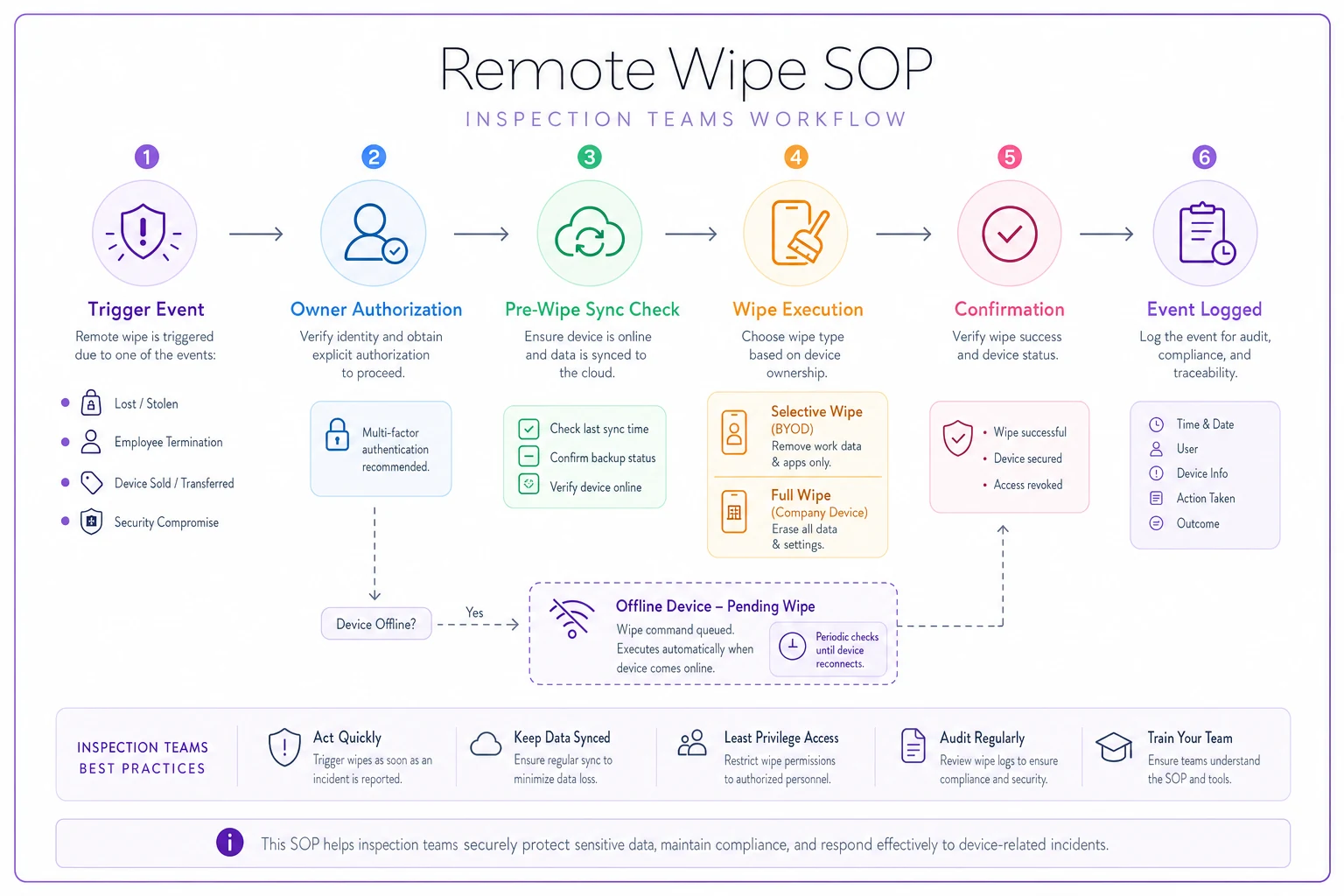
A usable remote wipe SOP is short. Here's the full sequence:
-
Trigger definition. Write down what counts as a wipe event
device lost/stolen, inspector termination, device sold or traded, or a security compromise (malware, phishing credential theft). Ambiguity here is what causes delay.
-
Single named owner plus one backup. One person (and a backup for coverage) has standing authority to initiate a wipe without waiting for a meeting. For BYOD, this is explicitly a selective wipe of the managed container only.
-
Time-to-wipe target. Set an SLA — for example, lost/stolen devices get wiped within 2 hours of report, terminations within the hour of the exit meeting. The number matters less than having one.
-
Pre-wipe sync check. Before wiping, confirm whether unsynced evidence sits on the device. If an inspector captured work that never uploaded, wiping destroys it. This is the step everyone forgets, and it's how teams accidentally erase the exact file an audit later needs.
-
Wipe execution and confirmation. Initiate, then confirm the device acknowledged the command (or flag it as pending if offline).
-
Log the event. Record device ID, trigger, who authorized, timestamp, wipe type (full vs selective), and sync status at time of wipe. This log is itself a chain-of-custody artifact.
Step 4 and Step 6 are the ones that protect you. The pre-wipe sync check prevents you from destroying evidence in the name of security, and the log proves you handled the device responsibly if anyone ever questions whether data was tampered with post-capture.
Here's a simple workflow diagram for the remote wipe process.
A pattern worth noticing
Terminations cause more evidence loss than lost phones. A stolen phone is an obvious trigger — people act fast. A departing inspector is a scheduled event where everyone assumes someone else owns the device offboarding, so it slips. Tie the wipe step directly into your HR exit checklist, not your security process, and this gap mostly closes.
Chain-of-custody controls that don't require a platform migration
You don't need a new system to preserve custody. You need four controls that work regardless of what device captured the evidence.
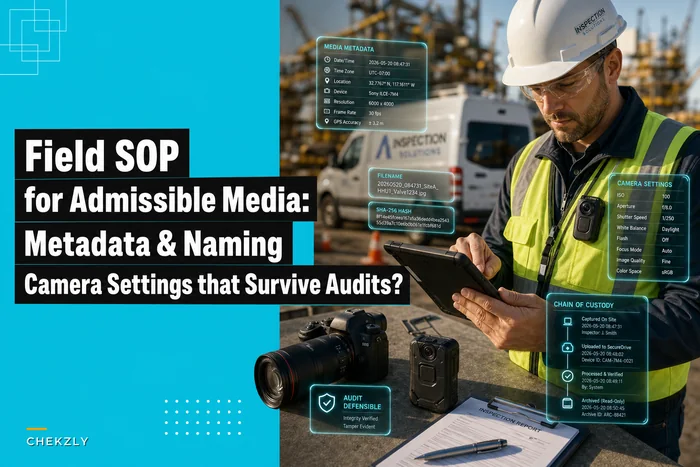
Capture-time identity binding. Every evidence file should carry, at minimum: who captured it (authenticated user, not a free-text name), when, and where. If your inspection app authenticates the user and stamps capture metadata, this is automatic. If inspectors are using personal cameras, this control simply doesn't exist — which is the strongest practical argument for keeping capture inside a managed app. The mechanics of making those captures defensible are worth getting right; the field practices in this SOP for admissible photos and video cover the metadata and settings that survive scrutiny.
Immediate controlled upload. The window between capture and arrival in a controlled store is the vulnerable zone. The longer evidence sits only on a device, the weaker the custody claim. Design for upload-on-capture or upload-at-next-connection, not end-of-day manual dumps. End-of-day uploads are where files get renamed, re-saved, and quietly altered.
Write-once archival. Once evidence lands in your system of record, it should not be editable in place. Corrections happen as new versions with their own custody trail, never by overwriting the original. This is the single biggest thing that separates audit-ready records from a shared drive full of photos. If you're building that records layer, the retrieval and metadata practices in this walkthrough on audit-ready inspection records are the natural companion to the device controls here.
Access and change logging. Who opened, downloaded, or modified a record, and when. You don't need enterprise SIEM for this — you need a log that exists and that you can export when asked.
Make capture authentication tied to your existing identity system so user identity is unambiguous across devices.
The reason these four work without a big IT project is that they're properties of your inspection app and storage, not your device fleet. Get them right once and they apply whether the inspector used a company phone, a BYOD container, or a backup device in a pinch.
A real scenario
A regional NDT inspection firm — around 14 inspectors, mostly BYOD on personal phones — ran into this during a client dispute. A refinery challenged a corrosion finding, and the firm needed to produce the original captures with provable custody. Roughly a third of the relevant photos had been captured on personal cameras and emailed in, so there was no authenticated capture identity, no reliable timestamps, and a renaming trail that made it look like files had been touched after the fact.
They didn't buy new hardware. They moved evidence capture into a managed inspection app with authenticated users and upload-on-capture, kept BYOD but turned on container-level selective wipe, and wrote a one-page remote wipe SOP tied to their HR offboarding. The whole change took a few weeks, not a quarter.
The difference showed up at the next client audit: evidence retrieval that used to take a day of digging through inboxes and shared folders dropped to under an hour, and every produced file carried a complete capture-to-archive trail. The dispute exposure didn't vanish, but the "we can't prove custody" problem — the one that actually loses cases — did.
The minimal checklist
If you do nothing else, work through this:
-
[ ] Classify your data into evidence-grade, operational, and personal tiers
-
[ ] Decide per-tier where data is allowed to live (BYOD container vs company device vs anywhere)
-
[ ] Confirm you have selective wipe before allowing BYOD for evidence
-
[ ] Name one wipe owner plus a backup, with standing authority
-
[ ] Write the wipe trigger list (lost/stolen, termination, device sold, compromise)
-
[ ] Set a time-to-wipe SLA, even a rough one
-
[ ] Add a mandatory pre-wipe sync check to the SOP
-
[ ] Log every wipe
device ID, trigger, authorizer, timestamp, type, sync status
-
[ ] Tie device offboarding into the HR exit checklist, not just IT
-
[ ] Require authenticated capture identity on every evidence file
-
[ ] Switch from end-of-day uploads to upload-on-capture or next-connection
-
[ ] Make archived evidence write-once; corrections as new versions only
-
[ ] Turn on access/change logging you can export
The checklist looks long written out, but most of these are one-time decisions. The actual ongoing burden is minimal once the structure is in place.
Where to actually start
Don't start with device policy. Start with the vulnerable window — the gap between capture and controlled storage — because that's where custody breaks regardless of which device model you pick. Close that first with authenticated capture and fast upload, and the BYOD-versus-company-device question gets much smaller. A broken phone is survivable if the evidence already left it with a clean custody trail. An uncontrolled capture workflow is not survivable no matter how locked down the hardware is.
The teams that handle this well aren't the ones with the biggest MDM budgets. They're the ones who decided, deliberately, which data touches which device, wrote a half-page wipe SOP somebody actually owns, and made the approved capture path the easiest path. That combination costs very little and holds up when it matters — which is the only test that counts.
The teams that handle this well aren't the ones with the biggest MDM budgets. They're the ones who decided, deliberately, which data touches which device, wrote a half-page wipe SOP somebody actually owns, and made the approved capture path the easiest path. That combination costs very little and holds up when it matters — which is the only test that counts.
Ready to modernize your inspection process?
Join 500+ inspection teams using Chekzly to reduce paperwork, improve compliance, and accelerate reporting.